
Livraison le jour même ou le lendemain

Qualité garantie

Débloquez vos offres de bienvenue: Livraison GRATUITE | Jusqu'à -80 % | 30 jours d'essai gratuits à JoyPlus
Téléchargez l'application
The 75% layout has emerged as the sweet spot for many users: more compact than a traditional keyboard, it still retains the essential function keys (F1-F12) and arrow keys, which are crucial for both productivity and gaming. The problem? The market is saturated with confusing marketing jargon. Between promises of a "premium" typing feel and features that are falsely revolutionary, it's easy to be misled and regret your purchase.
Before you commit, watch out for these common pitfalls:
To make an informed purchase, you need to look beyond the advertising claims and focus on objective technical criteria.
To navigate the jungle of spec sheets, here are the three non-negotiable points to check before pulling out your credit card for a 75% mechanical keyboard.
A true gasket mount keyboard does more than just isolate the mounting plate from the case. It uses multiple layers of absorbent materials (like PORON foam or silicone) to dampen every keystroke. This structure offers two concrete advantages:
Editor's Tip: Look for mentions of multiple dampening layers in the product description (case foam, PCB foam, IXPE switch pad, etc.).
A good mechanical keyboard is an investment. Its longevity primarily depends on its potential for customisation.
Certain details, which may seem secondary, can transform the daily user experience.
Based on these criteria, we've selected models that tick all the right boxes for different user profiles and budgets.
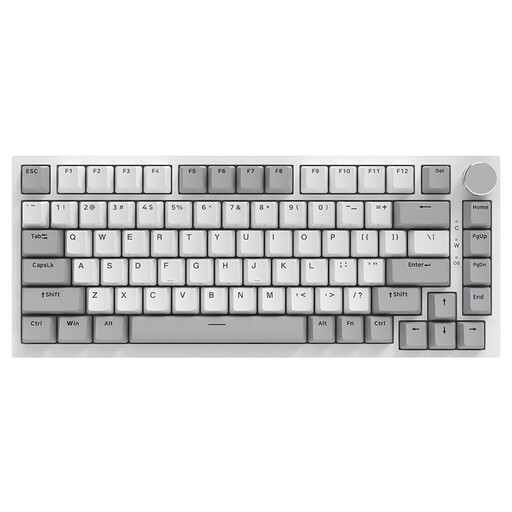
Why we picked it: Perfect for users who need a keyboard that's equally at home for remote work during the day and gaming at night. It packs features usually reserved for much more expensive models. It's an excellent, budget-friendly entry point into the world of custom keyboards.
It incorporates a true Gasket Mount structure with five layers of sound dampening, and its durable PBT keycaps won't start to shine after a few months of use.
An unbeatable feature-to-price ratio. Its CNC metal volume knob and hot-swappable (3/5-pin) compatibility make it a solid and perfectly upgradeable foundation.
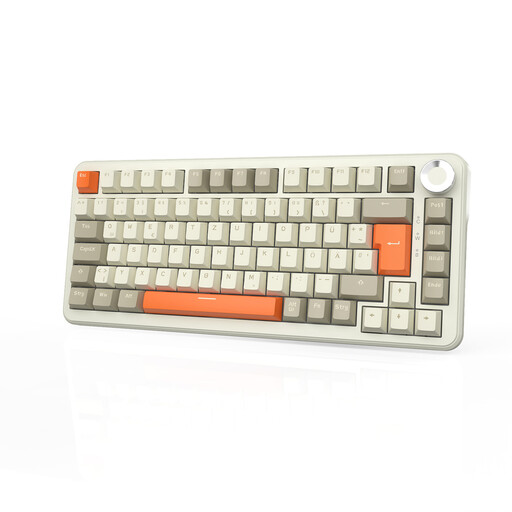
Why we picked it: The dream solution for professionals and creatives who juggle multiple devices (PC, Mac, tablet). The freedom of wireless, combined with an XXL battery, lets you maintain a clean desk setup without ever sacrificing performance.
Its factory-lubed switches and multi-layer Gasket structure provide a premium out-of-the-box experience. The hot-swappable sockets are robust and built to last.
Tri-mode connectivity (Bluetooth, 2.4G, USB-C) and a massive 8000 mAh battery for a life that's measured in weeks. The onboard memory saves your profiles and macros, regardless of the connected device.
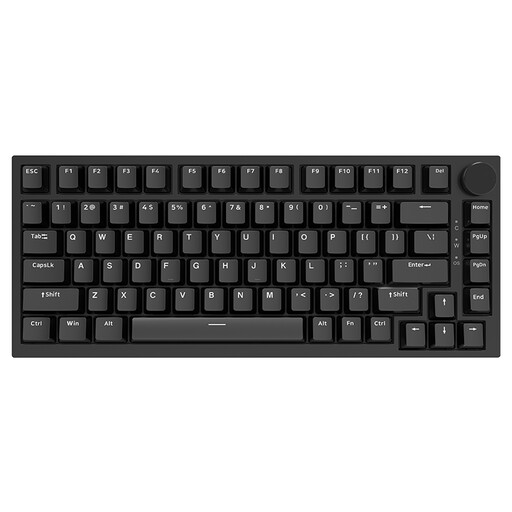
Why we picked it: For the player who wants a compact gaming keyboard to maximize mouse space. The wired connection guarantees zero latency, and the linear switches are optimized for maximum responsiveness in fast-paced games (FPS, MOBA).
This model combines an ultra-stable wired connection with PBT keycaps that resist sweat and wear from intense gaming sessions. Say goodbye to the "shiny" effect of ABS keycaps.
Linear (Red) switches for fast, smooth actuation. The 75% layout frees up a quarter of your desk space compared to a full-size keyboard, a decisive advantage for low-sens gamers.
If these models aren't exactly what you're looking for, we've put together a complete selection of products that meet our strict criteria.
Absolutely. It's one of the most versatile layouts available. It retains the function keys (F1-F12) and arrow keys, which are essential for many professional applications (spreadsheets, coding) and for gaming. Its compact size frees up desk space, which is a plus for both ergonomics and gamers.
These are the three main types of mechanical switches:
Regular maintenance is very simple. Once a month, use a soft brush and a can of compressed air to remove dust from between the keys. For a deep clean, remove the keycaps (using a keycap puller) and clean them with soapy water (be careful, they must be completely dry before being put back on). Always remember to unplug the keyboard before any cleaning.