
Livraison le jour même ou le lendemain

Qualité garantie

Débloquez vos offres de bienvenue: Livraison GRATUITE | Jusqu'à -80 % | 30 jours d'essai gratuits à JoyPlus
Téléchargez l'application
Looking for the perfect keyboard to optimize your desk setup without sacrificing any functionality? If your workspace is getting crowded and you're dreaming of a more responsive and comfortable typing experience than standard membrane keyboards offer, the 75% layout has emerged as the most elegant solution. It retains the precious arrow and function keys in an ultra-compact form factor. The icing on the cake is the addition of a customizable screen, which opens up a new world of possibilities, from monitoring your PC's performance to displaying your favorite GIFs.
This guide breaks down the essential features of these peripherals and presents a selection of standout models to help you make the right choice, whether you're a gamer, developer, or creative professional.
With so many options available, it can be tough to know where to start. Here are three key criteria to guide your decision.
The feel under your fingertips is paramount. Today, most high-end mechanical keyboards feature a Gasket mount. Unlike a rigid screw-in design, this architecture uses silicone or Poron gaskets to "suspend" the plate holding the switches between the top and bottom parts of the case. The result: a softer typing feel, a more muted sound, and a significant reduction in vibrations, which reduces fatigue during long gaming or work sessions. This is a must-have feature for anyone who prioritizes acoustic and tactile comfort.
A tri-mode Bluetooth keyboard is synonymous with ultimate versatility. It allows you to easily switch between three connection types:
This flexibility is perfect for multi-device users and for those who want a clean, cable-free desk.
Customization is at the heart of the mechanical keyboard experience. A hot-swappable mechanical keyboard allows you to change the switches without any soldering. This gives you the freedom to test different types of switches (linear, tactile, clicky) to find the perfect typing feel for you.
In parallel, a keyboard with a built-in TFT screen adds a functional dimension to customization. This screen can display system information (battery level, time), the connection mode, or even GIF animations, turning your keyboard into the centerpiece of your setup.
Here are a few models that stand out from the crowd for their features and cater to different needs and budgets.
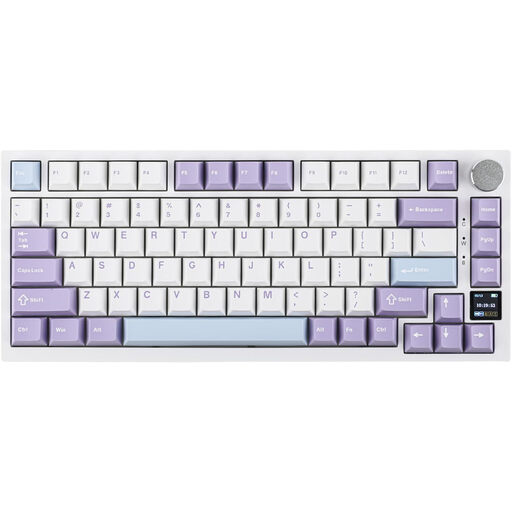
Why it stands out
The Ajazz AK820 Pro is the archetype of a pre-built custom keyboard that checks all the right boxes. Its TFT color screen is particularly well-designed for viewing the connection mode, remaining battery life, or operating system (Win/Mac) at a glance. Its gasket mount structure, combined with multiple layers of sound-dampening foam, delivers a very high-end acoustic and typing experience.
Key features
Who is it for? For users, both gamers and professionals, who are looking for a ready-to-use compact QWERTY keyboard that offers a package of premium features (screen, gasket, tri-mode) without the hassle of a complex build.
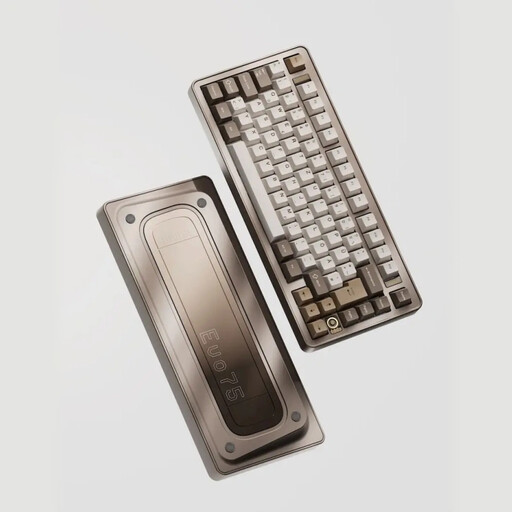
Why it stands out
The Ticktype EVO75 is a step up, with a 100% aluminum construction and a Leaf Spring mounting structure—an evolution of the gasket mount that offers even more flexibility. Its compatibility with VIA software opens the door to extreme key and macro customization. An expert choice for enthusiasts who appreciate premium materials and cutting-edge engineering.
Key features
Who is it for? For tech enthusiasts and demanding professionals seeking a top-tier typing experience in a premium package, and who want full control over the customization of their work tool.
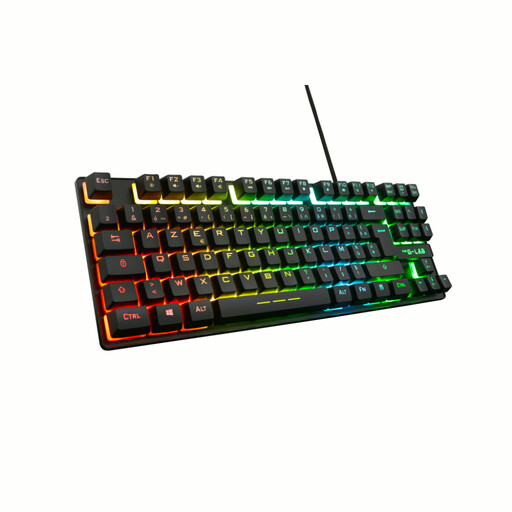
Why it stands out
Although it's neither a 75% nor a model with a screen, the Keyz Caesium TKL is a relevant alternative for those who prioritize a compact gaming format at a more accessible price point. Its TKL (tenkeyless) layout frees up maximum space for the mouse, and its membrane technology ensures quiet typing. It is also available in an AZERTY layout.
Key features
Who is it for? For gamers looking for a compact, responsive, and quiet keyboard, without wanting to invest in the advanced features (mechanical, screen, hot-swap) of more expensive models.
If none of these models caught your eye or you simply want to explore other form factors, our full selection of keyboards is here for you.
Explore our complete collection of backlit wireless keyboards to discover other gems.
A TKL (80% layout) keyboard simply removes the number pad but keeps the standard spacing and layout of the navigation cluster (Insert, Delete, End, etc.). A 75% keyboard takes compactness a step further: it compresses all the keys together, aligning the function row (F1-F12) and the navigation cluster (often vertically) to save maximum space while still keeping the arrow and F-keys.
The hot-swappable feature is a huge advantage for customization and the keyboard's lifespan. It allows you to change mechanical switches without any soldering. This means you can experiment with different types of switches (linear for gaming, tactile for writing) to tailor the keyboard to your preferences. Plus, if a switch fails, you can replace it yourself in seconds instead of throwing the keyboard away.
A keyboard with a TFT screen serves a dual purpose: functional and aesthetic. On the practical side, it can display useful information like the time, date, battery level, connection mode (Bluetooth, 2.4G, wired), or even CPU load. On the aesthetic side, it allows you to display images or animated GIFs, giving you a unique opportunity to add a personal touch to your setup.