
Livraison le jour même ou le lendemain

Qualité garantie

Débloquez vos offres de bienvenue: Livraison GRATUITE | Jusqu'à -80 % | 30 jours d'essai gratuits à JoyPlus
Téléchargez l'application
The 75% mechanical keyboard layout is quickly becoming a popular choice, and for good reason. It offers a near-perfect balance: compact enough to free up desk space, while still retaining the precious function keys (F1-F12) and arrow keys that are essential for both work and play.
But with an overwhelming number of options, it's hard to know where to start. Switches, connectivity, materials, technical jargon... product pages can quickly become a headache. Don't worry! This guide is here to break down the key features and present our selection of the best models, helping you find the perfect keyboard for your needs.
Before diving into our top picks, let's review the key criteria to guide your choice.
This is the first decision you'll need to make, and it depends entirely on your use case.
The real appeal of a mechanical keyboard is the ability to customise it to your liking.
Build quality has a direct impact on longevity, sound, and the feel under your fingers.
Enough theory, let's get practical! Here are the models that caught our eye, for every need and budget. They are all available in a QWERTY keyboard (US) layout, a format favoured by developers and gamers.
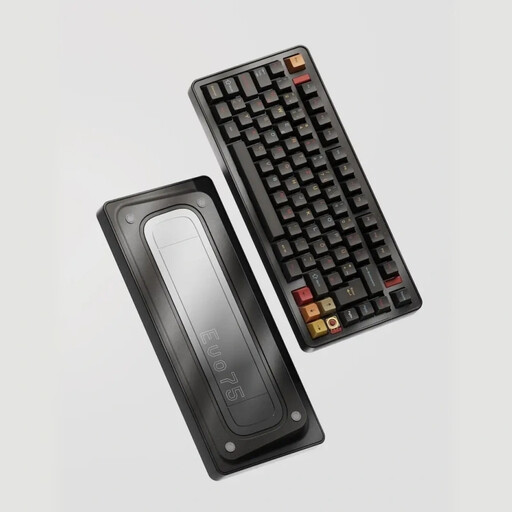
What makes it stand out? The Ticktype EVO75 is aimed at enthusiasts who want a premium experience without the hassle. Its 100% aluminium keyboard case, internal Leaf Spring Mount structure, and massive 8000 mAh battery make it a decidedly high-end model.
Key Features
Who is it for? For demanding users and custom mechanical keyboard enthusiasts looking for a turnkey model with no compromises on quality.
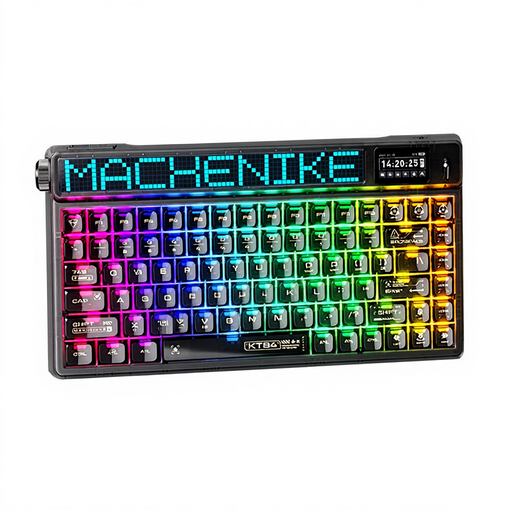
What makes it stand out? The Machenike KT84 stands out from the crowd with its customisable smart screen. This thoughtful extra lets you display system info, the time, or even animated GIFs, adding a touch of style and functionality to your setup.
Key Features
Who is it for? For the gamer and the tech-savvy user who loves innovative gadgets and wants a keyboard that looks like no other, without sacrificing performance.
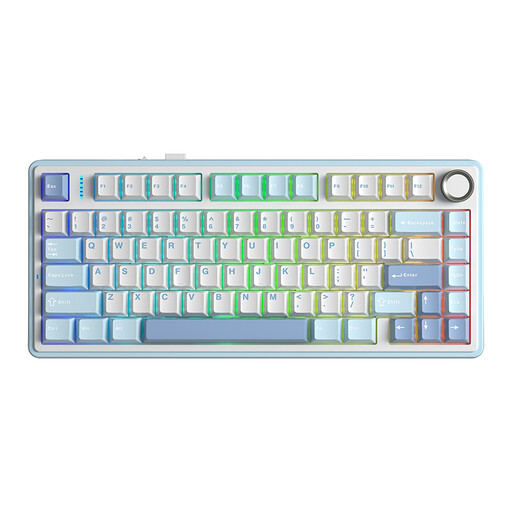
What makes it stand out? The AULA F75 is the value-for-money champion. It packs features worthy of much more expensive models, like a Gasket Mount structure for a muted sound, factory-lubed switches, and full connectivity.
Key Features
Who is it for? The perfect choice for beginners in the mechanical keyboard world or for those on a tight budget who don't want to compromise on typing quality and features.
This selection is just a glimpse of the excellent 75% models available. To discover a wider variety of layouts, switches, or designs, take a look at our full catalogue.
? Discover Our Full Range of US Mechanical Keyboards
The 75% layout is the sweet spot. It's more compact than a TKL (or 80%) because it eliminates unnecessary gaps, but it keeps the function row (F1-F12) and arrow keys, which are missing on 60% or 65% keyboards. It's the ideal layout for saving desk space without sacrificing keys that are useful for productivity.
A keyboard is called hot-swappable when its mechanical switches can be removed and replaced without any soldering. Using a simple tool (often included), you can pull out a switch and clip in another one. This is perfect for fixing a faulty key or, more importantly, for customising the typing feel by testing different types of switches.
Even though the standard layout in countries like France is AZERTY, many users (especially developers and gamers) prefer the QWERTY keyboard. Its layout is often considered more logical for coding and is the absolute standard in video games. The adjustment period is very short: you just need to set your operating system's input language (Windows, macOS, Linux) to "English (US)" for everything to match up. And with a VIA-programmable keyboard, you can even reassign certain keys to create a custom hybrid layout.