
Livraison le jour même ou le lendemain

Qualité garantie

Débloquez vos offres de bienvenue: Livraison GRATUITE | Jusqu'à -80 % | 30 jours d'essai gratuits à JoyPlus
Téléchargez l'application
For competitive gamers, every millisecond counts. Screen tearing, motion blur, or noticeable latency can be the difference between victory and defeat. With technology constantly evolving, choosing a monitor built for high-level esports can be a daunting task. This article breaks down the advantages of the new 500Hz OLED gaming monitors and guides you to the best choice, without the unnecessary marketing jargon.
To select the right high-performance monitor, there are a few key technical specifications to look out for. Here are three essential criteria to guide your decision.
A 500Hz refresh rate means the image is updated 500 times per second. Paired with a near-instantaneous response time of 0.03ms, as seen on a 0.03ms esports display, this duo guarantees exceptional fluidity and image clarity during fast-paced action. For first-person shooter (FPS) games where responsiveness is king, such a setup can provide a decisive advantage by eliminating motion blur and improving target tracking accuracy.
The QD-OLED monitor (Quantum Dot OLED) is a true game-changer. Unlike traditional LCD panels, each pixel emits its own light, resulting in perfect blacks and infinite contrast. The VESA DisplayHDR True Black 500 certification ensures deep, inky blacks and intense peak brightness, revealing every detail in dark areas. Most models also feature an effective anti-glare gaming screen, which is essential for perfect visibility, even in broad daylight.
To take full advantage of a 500Hz G-Sync screen or an AMD FreeSync Premium Pro compatible one, a powerful graphics card is essential. These technologies synchronise the monitor's refresh rate with the frames generated by the GPU (graphics card). The result is a perfectly smooth gaming experience, without stuttering or screen tearing, for total immersion and flawless responsiveness.
Let's move on to our selection. Here are monitors that tick all the boxes for demanding gamers and even content creators.
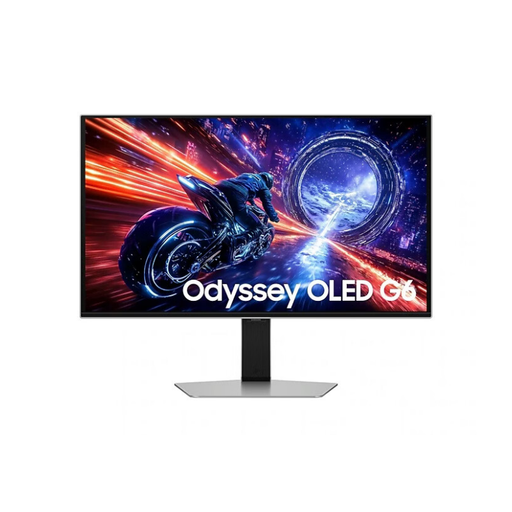
Why It Stands Out: The Samsung Odyssey OLED G6 is one of the pioneers in combining a QD-OLED panel with a 500Hz refresh rate. Its UL-certified anti-glare matte finish and Pantone validation make it a versatile tool, equally at home in competitive gaming and creative work where colour accuracy is paramount.
Pros:
Who It's For: This 27-inch QHD gaming monitor is aimed at esports players and die-hard FPS fans seeking maximum responsiveness. It's also a perfect fit for content creators who switch between gaming sessions and graphic design applications.
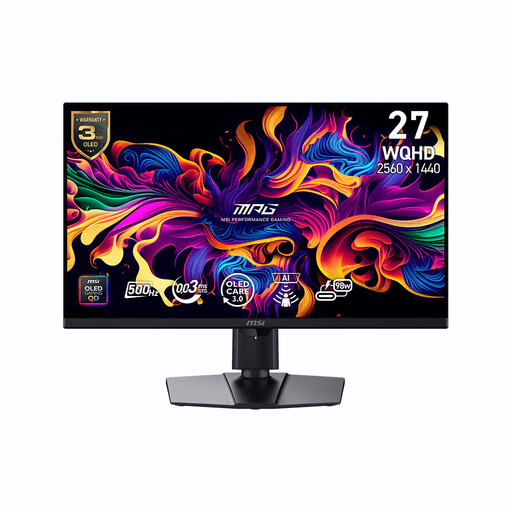
Why It Stands Out: The MSI MPG 271QR stands out with its cutting-edge connectivity, including a DisplayPort 2.1a port and a USB-C port delivering 98W. It also packs smart features like the AI Care sensor, which adjusts the display based on your presence, and a solid 3-year warranty that covers burn-in.
Pros:
Who It's For: Ideal for tech enthusiasts who want a state-of-the-art setup capable of connecting to multiple devices (PC, console, laptop) while enjoying the latest innovations in connectivity and screen protection.
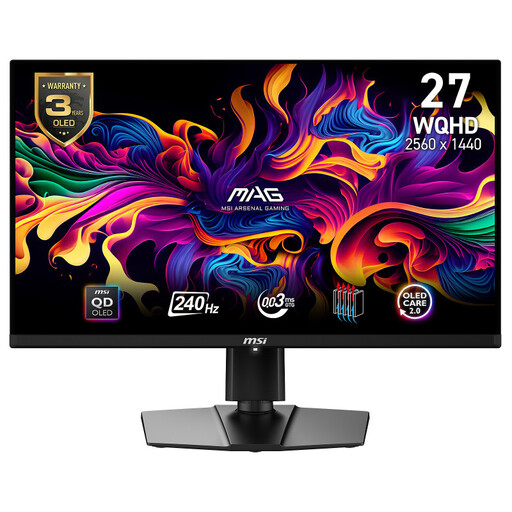
Why It Stands Out: This model makes QD-OLED image quality accessible with a 240Hz refresh rate, which is still a top-tier performance for the vast majority of games. It's a smart choice for those who prioritise image quality and fluidity without aiming for the absolute peak of 500Hz, especially for console gaming thanks to its HDMI 2.1 port.
Pros:
Who It's For: PC and console gamers who want to experience the superiority of QD-OLED with already excellent fluidity, without necessarily investing in the beast of a machine required to hit 500 frames per second.
Ultra-high refresh rate monitors are built for competition. If your needs are different, if you play less fast-paced titles, or if you're looking for a more versatile secondary screen, our selection of 75Hz monitors might offer better value for money. Explore our other selections to find the right screen for you.
1. Does a 500Hz screen really make a difference in gaming? Absolutely. For ultra-fast competitive games like FPS (Counter-Strike, Valorant) or racing games, the difference is striking. The reduction in motion blur and display latency allows for more precise target tracking and massively improved responsiveness. However, for slower-paced games (strategy, RPGs) or for office work, the benefit is far less obvious.
2. Is the risk of burn-in still a concern for OLED screens in 2026? This risk is now much better managed thanks to advanced protection technologies. Systems like Samsung OLED Safeguard+ or MSI OLED Care use algorithms to detect static images (logos, taskbars), optimised cooling, and pixel shifting to preserve the panel's lifespan. The good news is that manufacturer warranties are increasingly covering this phenomenon.
3. What graphics card do you need for a 500Hz QHD OLED gaming monitor? Let's be clear: to reach and maintain 500 frames per second at QHD (2560 x 1440) resolution, you'll need a powerhouse of a GPU. You should aim for a top-tier card from the latest NVIDIA (GeForce RTX series) or AMD (Radeon RX series) generations to hope to get the most out of such a monitor, especially on the most demanding recent games.