
Livraison le jour même ou le lendemain

Qualité garantie

Débloquez vos offres de bienvenue: Livraison GRATUITE | Jusqu'à -80 % | 30 jours d'essai gratuits à JoyPlus
Téléchargez l'application
Buying a new TV can quickly become a headache. Between the technical acronyms and marketing promises, it's easy to feel lost and end up regretting your purchase. As a product expert at Joybuy, my role is to help you make sense of it all. Let's review the pitfalls to avoid and the criteria that truly matter for choosing the right 4K TV for your needs, without breaking the bank.
The market is flooded with often misleading marketing claims. Here are 3 things to check to avoid making a mistake.
You'll often see terms like "Fluidity Index 1200" or "Motion Rate 240". These figures are purely for marketing and have nothing to do with the panel's native refresh rate. They are indexes achieved through software processing that, instead of improving the image, often create a very artificial "soap opera effect". The only data that matters is the native refresh rate, expressed in Hertz (Hz). For standard use (movies, series, TV shows), a 60 Hz panel is more than enough. However, for TV gaming or watching sports, a native 100/120 Hz panel makes a real difference and offers far superior smoothness.
Not all Smart TVs are created equal. An outdated or underperforming operating system (OS) will quickly turn your experience into a nightmare: missing apps, laggy menus, unpatched security flaws... A modern OS like Google TV or webOS is a guarantee of a smooth experience, with a large app catalogue and regular updates.
Next-gen consoles, soundbars, Blu-ray players... your devices add up. A TV with only two HDMI ports or, worse, without an HDMI 2.1 port, will quickly become a bottleneck. This standard is simply essential to enjoy TV gaming in 4K at 120 Hz on recent consoles. Always check the number and type of ports.
Forget the marketing jargon. Here are the three technical characteristics that truly matter.
This is the core component that determines picture quality.
The ideal size depends primarily on your viewing distance. For a 55-inch TV (139 cm), a viewing distance of about 1.7m to 2.3m is recommended for perfect immersion without being able to distinguish individual pixels. A simple tip: measure your living room before you decide! A screen that's too large for a small space is not comfortable and can even cause eye strain.
Also, consider how the TV will fit into your living room. A suitable TV stand must be stable and wide enough to hold the screen securely. To save space and achieve a cleaner, more streamlined look, a wall mount is an excellent option. Be careful: make sure the wall is load-bearing (concrete, brick) and choose a VESA compatible mount that can support your TV's weight. For peace of mind, hiring a professional TV installation service is often the wisest choice.
To help you make a concrete choice, here are a few models that meet specific needs, based on the criteria we've just discussed.
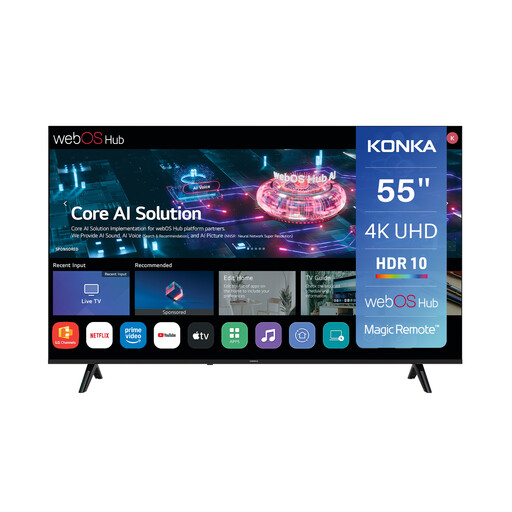
Why this model? It covers the essentials for family use: a large 55-inch 4K screen, direct access to streaming services (Netflix, YouTube, Prime Video), and a very competitive price.
Its webOS operating system is known for its smoothness and user-friendly design, protecting you from the pitfall of a laggy "Smart TV". The 60 Hz refresh rate is stated transparently, without inflated numbers.
An excellent screen size-to-price ratio. Its Magic Remote is a real bonus for navigation. Integrated AirPlay and Google Cast compatibility.
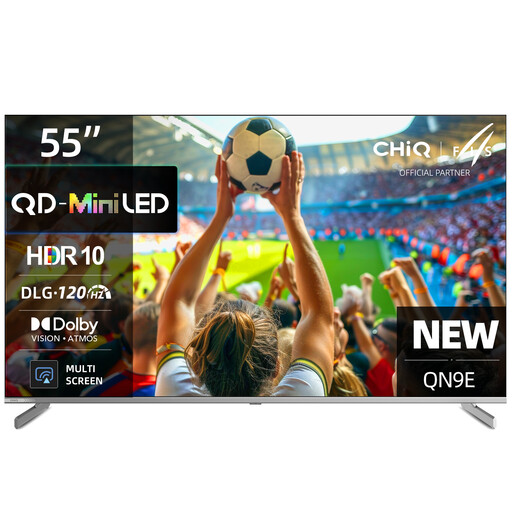
Why this model? This is the TV for movie nights. The combination of Mini LED and QLED ensures deep blacks and vibrant colours. Dolby Vision and Dolby Atmos compatibility complete the package for total immersion.
No marketing fluff here. The TV highlights its advanced image technologies (Mini LED, QLED) and its modern Google TV OS, which guarantees responsiveness and a nearly infinite app catalogue.
High contrast and brightness for stunning HDR performance. Smooth motion optimised for sports and action movies thanks to 120 Hz DLG and MEMC.
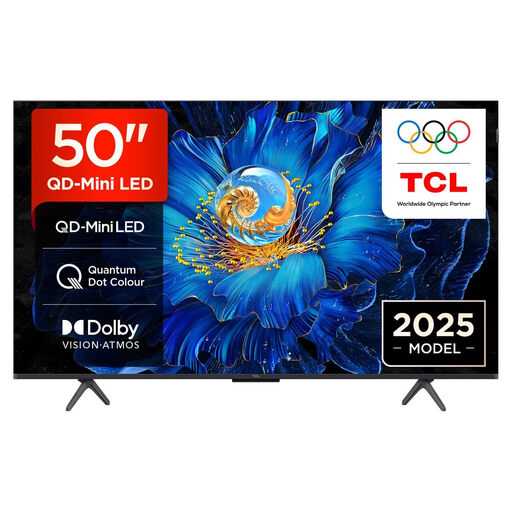
Why this model? It's a powerhouse for TV gaming. A native 144 Hz refresh rate, HDMI 2.1 ports, and dedicated features (Game Master, ALLM, VRR): everything is here for next-gen consoles and PCs.
It checks all the right boxes: a high, clearly stated native refresh rate (144 Hz) and the crucial HDMI 2.1 connectivity, the essential key for gaming in 4K at over 120 fps.
Formidable smoothness for competitive gaming. Low input lag and no screen tearing thanks to VRR. The QD-Mini LED technology ensures a rich, high-contrast picture.
A great TV deserves a stand that matches its quality. A sturdy and stylish TV stand, like the 5five Aliaj oak-effect model, will complete your setup. If you opt for a wall mount, services like TV wall mount installation guarantee a professional and risk-free installation.
A well-chosen TV stand does more than just support your screen: it elevates your setup. Timeless oak-coloured models bring a warm touch to any living room. Discover our selection that combines design and practicality.
On average, a 4K TV is designed to last between 7 and 10 years (or 60,000 to 100,000 hours). That said, with the rapid evolution of technology (new HDR standards, OS updates, etc.), a TV will often be considered "outdated" long before it actually fails.
No, absolutely not. Movies are filmed at 24 frames per second, and a good 60 Hz TV will display them perfectly. A 120 Hz frequency is primarily an advantage for sports, which gain clarity, and of course for video games on compatible consoles and PCs. For a purely cinematic experience, prioritise a 60 Hz model with excellent picture quality (contrast, colours).
Safety first.