
Livraison le jour même ou le lendemain

Qualité garantie

Débloquez vos offres de bienvenue: Livraison GRATUITE | Jusqu'à -80 % | 30 jours d'essai gratuits à JoyPlus
Téléchargez l'application
Capturing smooth, professional-looking video is now within reach for content creators, travellers, and hobbyists alike. A 4K gimbal camera promises perfectly stable footage and near-cinematic quality, all in a pocket-sized format. However, the market is flooded with models whose marketing promises often hide deal-breaking flaws. This guide is here to help you avoid the pitfalls and focus on the features that truly matter.
Too many buyers regret their purchase, trapped by gimmicky features or frustrating technical limitations. To ensure you're not one of them, here are the three mistakes you must not make.
To make an informed choice, focus on these three fundamental parameters that define a good camera for vlogging or travel.
This is the non-negotiable feature. A 3-axis stabilised camera uses motors to actively compensate for movements on three axes: pan (left/right), tilt (up/down), and roll (rotation). The result: perfectly smooth videos, even while walking or running, with zero degradation in image quality. This is what separates amateur footage from professional-looking results.
Not all 4K is created equal. The final image quality depends primarily on the size and performance of the sensor. Opt for models equipped with reputable sensors (e.g., from Sony) that guarantee a native 4K Ultra HD (3840 x 2160 pixels) resolution. A good sensor ensures better light management, more accurate colours, and greater detail in both dark and bright areas—a decisive advantage for a 4K travel camera.
Aim for at least 120 minutes of battery life when recording in 4K. The presence of a USB-C port is also a major plus, as it allows for fast charging with the chargers and power banks you already own. Finally, Wi-Fi connectivity is essential for quickly transferring your files to a smartphone and sharing them on social media without fumbling with cables.
Rather than an endless list, we've selected models that meet specific needs, all while avoiding the pitfalls mentioned earlier.
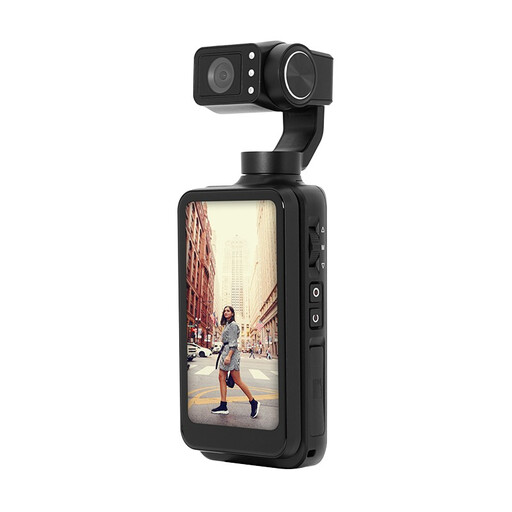
Ideal for: Those who want a high-performance, all-in-one solution that stands as a true alternative to the DJI Pocket. Its compact form factor means you won't be weighed down by heavy gear, making it perfect for vlogging and travel diaries.
Unlike digital stabilisation that degrades the image, this model features a true 3-axis mechanical gimbal. Its battery life (up to 170 minutes) and large 3.5-inch touchscreen check the boxes for endurance and ergonomics.
High-performance Sony 4K sensor and a large rotating screen for perfect framing in selfie mode. Features intelligent face tracking and integrated Wi-Fi connectivity.
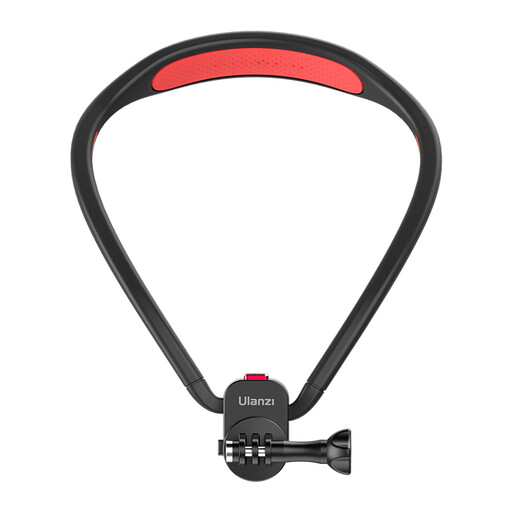
Ideal for: Action cam owners who want immersive point-of-view (POV) shots, keeping their hands completely free during activities.
This accessory directly tackles the ergonomics problem by freeing up your hands. It allows you to leverage your camera's stabilisation in situations (biking, hiking, tutorials) where holding a selfie stick is simply impossible.
Ultra-fast magnetic attachment and comfortable to wear for unique hands-free shots. A great way to vary your angles without buying a new camera.
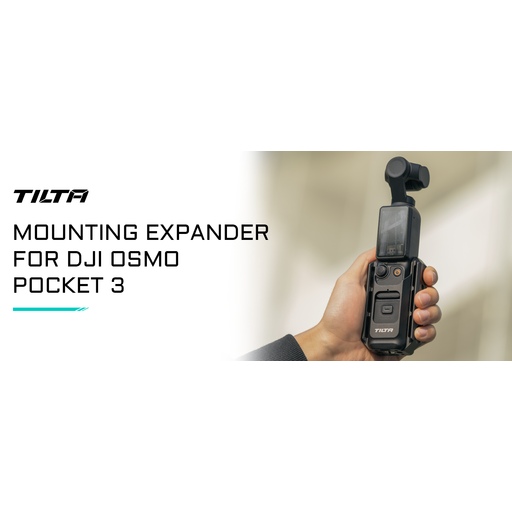
Ideal for: DJI Osmo Pocket 3 users who want to boost its capabilities by adding essential accessories (external mic, LED light) without sacrificing its legendary compactness.
It solves the main drawback of pocket cameras: the lack of mounting points. This expander adds 1/4" screw threads without adding bulk, saving you from investing in a second, more cumbersome device.
Adds crucial mounting points (mic, light) to your setup, dramatically increasing its versatility for a minimal investment.
We've put together a complete and up-to-date selection of products that meet our selection criteria and current standards.
Battery life depends on the model and usage, but you can expect around 90 to 120 minutes of continuous recording. Top-performing models, like the AgfaPhoto Realimove MC3X, can push up to 170 minutes under ideal conditions. For long sessions, a USB-C power bank remains your best friend.
Not at all. Modern models are designed to be incredibly intuitive. The gimbal calibrates itself on startup, and the touchscreens, clear menus, and automatic subject tracking features allow you to get started right away, even with no prior video experience.
An all-in-one camera like the AgfaPhoto is ready to use right out of the box. However, for professional-quality audio, an external microphone is often the first wise investment. A mini-tripod or a mounting bracket will also open up new shot possibilities. Our advice: start with the camera alone, identify your needs in the field, and then build out your kit as you go.