
Livraison le jour même ou le lendemain

Qualité garantie

Débloquez vos offres de bienvenue: Livraison GRATUITE | Jusqu'à -80 % | 30 jours d'essai gratuits à JoyPlus
Téléchargez l'application
A front and rear 4K dashcam can record what’s happening on the road, provide useful evidence after a collision, or keep an eye on your parked vehicle. But the resolution printed on the box isn’t everything. The difference between models that genuinely suit your needs and those whose features quickly become a hassle often comes down to the finer details.
Before you place an order, three common pitfalls keep cropping up:
With a car camera that includes a rear camera, check the resolution of the front and rear lenses separately. The 4K + 1080p combination is very common: the front camera captures more detail on signs and number plates, while the rear camera documents what’s happening behind the vehicle.
Dual-camera dashcams are well suited to daily commutes and drivers who want to monitor both directions. A 3-channel dashcam typically adds a cabin-facing camera, which is handy for families, shared vehicles or professional drivers. 4-channel dashcam models can record the front, rear and both sides, but they also mean more cables, more storage space and more time spent on installation.
Night vision isn’t just about seeing the word “night” on the spec sheet. Instead, look at the following:
Sony STARVIS 2 sensors, such as the IMX678 or IMX662 found on some models, are worth comparing. However, they don’t guarantee perfect image quality in every situation – a poorly lit street, heavy rain or oncoming headlights can still challenge any camera.
Built-in GPS typically records the location, route and speed alongside the video. 5 GHz Wi-Fi can speed up file transfers to your smartphone, although its range is limited to the area around your car. Some models only offer 2.4 GHz Wi-Fi, which is perfectly adequate for occasionally checking your recordings.
24-hour parking mode often requires a smart hardwire kit to avoid draining your vehicle’s battery. Collision detection, the G-sensor and pre-buffered recording can lock a clip after an impact, but check that they’re compatible with your car and the type of connection planned. As for voice control, it’s mainly useful for taking a photo, locking a video or activating a function without touching the screen.
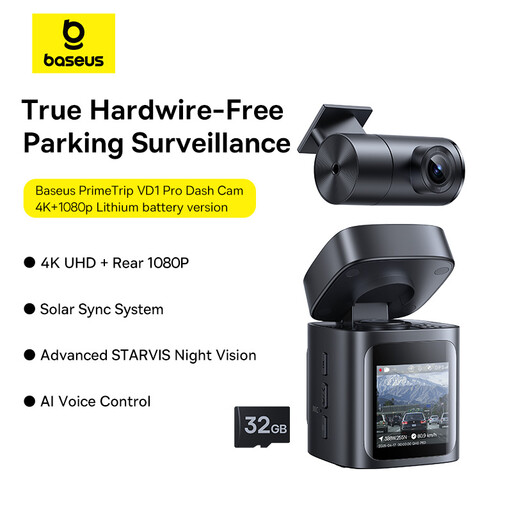
Why this suits this profile: Its 4K front and 1080p rear setup is ideal for anyone who wants to cover both directions without jumping straight to a multi-channel system.
The product page clearly states the 4K + 1080p combination. So there’s no chance of mistakenly thinking both cameras record at the same resolution.
A front and rear system powered by a lithium battery, according to the product name.
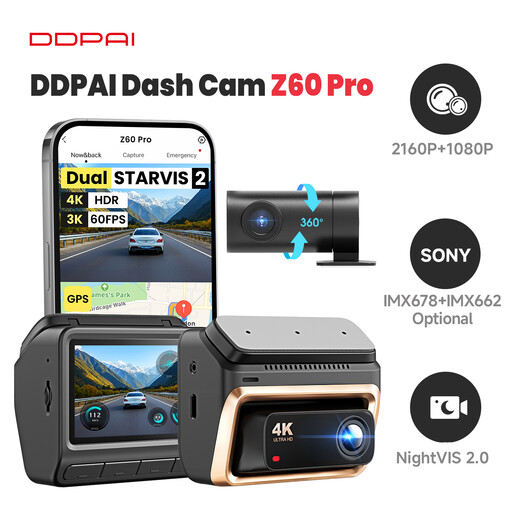
Why this suits this profile: It combines a 4K front camera, a rear camera, a 3-inch IPS screen, GPS and 5 GHz Wi-Fi in an expandable package.
The product page clearly separates the optional features: 24-hour parking mode and certain 4G services require accessories sold separately.
Sony STARVIS 2 IMX678 sensors at the front and IMX662 at the rear, HDR and support for microSD cards up to 512 GB.
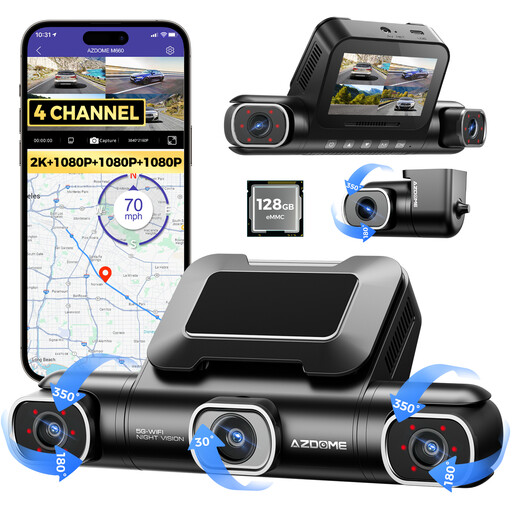
Why this suits this profile: Its four channels cover the front, rear and sides. An interesting setup for keeping an eye on a parked vehicle in a busy area.
The resolution of each channel is stated separately: 2.5K at the front and three channels at 1080p, rather than a vague promise of 4K on every view.
Built-in 128 GB eMMC memory, GPS, 5 GHz Wi-Fi, voice control and pre- and post-collision emergency recording, according to the product page.
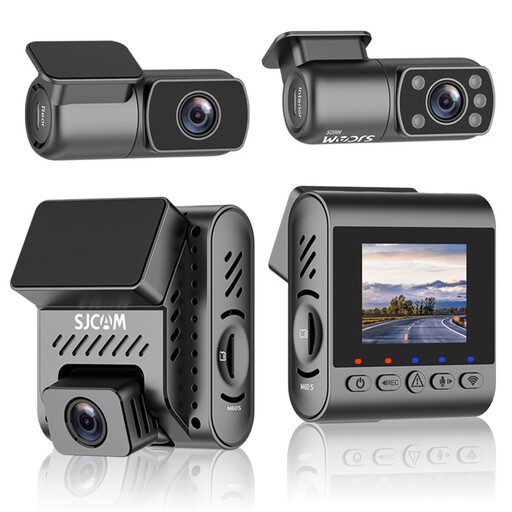
Why this suits this profile: The interior camera complements the front and rear views. It’s particularly useful for families, car-sharing or drivers who regularly carry passengers.
All three resolutions are specified: 4K at the front, 2K at the rear and 1080p in the cabin. Wi-Fi is limited to the 2.4 GHz band, not 5 GHz.
Infrared vision for the cabin, a G-sensor, WDR, H.265 encoding and a 64 GB memory card included, according to the product page.
We’ve put together a comprehensive, real-time selection of products that meet these strict criteria, while also taking European safety regulations into account.
Mount the front camera behind the rear-view mirror, in a position where it won’t obstruct your view. Route the rear camera cable under the trim rather than letting it dangle near the pedals. Before you set off, check the viewing angle, the date, the time and that loop recording is working properly.
To use parking mode, choose a hardwire kit that’s compatible with your car model. Also check the maximum capacity your camera supports and pick a card that’s fast enough – typically U3 class for 4K footage. Remember to save or lock important videos before they get automatically overwritten.
Recordings may show number plates and people. Only keep the clips you need, and avoid publishing a video that could identify others without taking the necessary precautions.
Yes, if the model has a parking mode and the necessary electrical connection has been made. In many cases, a hardwire kit sold separately is essential to power the camera when the engine is off and to monitor the battery voltage.
Start by checking the maximum capacity the manufacturer supports. For 4K recording, choose a fast microSD card – preferably U3 and class 10 if the product page recommends it. Remember to format it regularly from the camera or its app.
These two features serve different purposes. 5 GHz Wi-Fi speeds up video downloads to your smartphone over short distances. Built-in GPS adds location, route and sometimes speed information to your footage. If you want to quickly find a recording and understand the context in which it was made, the two features can work perfectly together.