
Livraison le jour même ou le lendemain

Qualité garantie

Débloquez vos offres de bienvenue: Livraison GRATUITE | Jusqu'à -80 % | 30 jours d'essai gratuits à JoyPlus
Téléchargez l'application
3D printing is no longer a niche hobby: it's a revolution accessible to everyone, from creators and engineers to weekend DIY enthusiasts. But with a jungle of models on the market, finding your way can be tough. Which 3D printer is truly right for you? Whether you dream of prototyping an invention, decorating your home with unique objects, or repairing an appliance with a custom-made part, choosing the right machine is the crucial first step.
This guide is here to help you navigate the options. We'll break down the essential criteria and present our selection of the best models currently available to help you buy a 3D printer with confidence.
Before you pull out your credit card, let's review the key technical points that will make all the difference in your print quality and user experience.
This is the first question to ask yourself: how big will your creations be? The build volume (expressed as W?×?D?×?H) defines the maximum dimensions of an object you can print in one go. For miniatures or small mechanical parts, a standard volume of around 220?x?220?x?250?mm is perfectly fine. However, for full-scale prototypes, cosplay elements, or large decorative items, a large-format 3D printer becomes essential. Don't forget to measure the available space in your home, too: some machines have a particularly large footprint!
Most consumer-grade 3D printers use FDM (Fused Deposition Modeling) technology. The principle is simple: a plastic filament is heated and deposited layer by layer to build the object. Speed, expressed in mm/s, is a major factor: a fast 3D printer can cut your print times in half or even by a third—a precious time-saver for both pros and the impatient.
Precision, on the other hand, is the name of the game. It depends on the machine's sturdiness, but also on features that have become must-haves, like automatic bed leveling. This technology ensures a flawless first layer, which is a prerequisite for any successful print.
A multi-colour 3D printer is no longer a luxury. It allows you to bring complex, multi-coloured objects to life without manually swapping filaments. It's an increasingly popular feature for achieving a truly finished look right off the print bed.
Material compatibility is just as crucial. A beginner 3D printer will often be limited to PLA, a very easy-to-use filament. But more advanced models, equipped with nozzles capable of heating beyond 300?°C, open up a world of possibilities: PETG, TPU (flexible), or even composite filaments filled with carbon fibre for ultra-strong parts.
Here are a few machines that have caught our eye. They cater to a variety of needs and budgets, from beginner makers to demanding professionals.
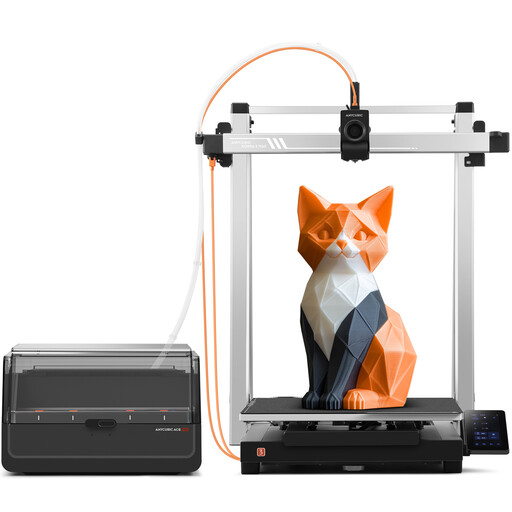
Why it stands out: The ANYCUBIC Kobra 3 Max Combo is a beast of a machine, designed for those who think big. Its colossal 420?x?420?x?500?mm build volume allows for the creation of giant parts or batch production. Its ACE Pro system seamlessly manages up to 8 colours simultaneously. With a top speed of 600?mm/s and smart features (AI failure detection, LeviQ 3.0 leveling), it's a true production tool. The filament drying box is a smart addition that guarantees material quality, even for the most finicky filaments.
Highlights:
Who is it for? Professionals, SMEs, and ambitious creators looking to combine very large format and multi-colour printing for rapid prototyping, small-batch production, or complex works of art.
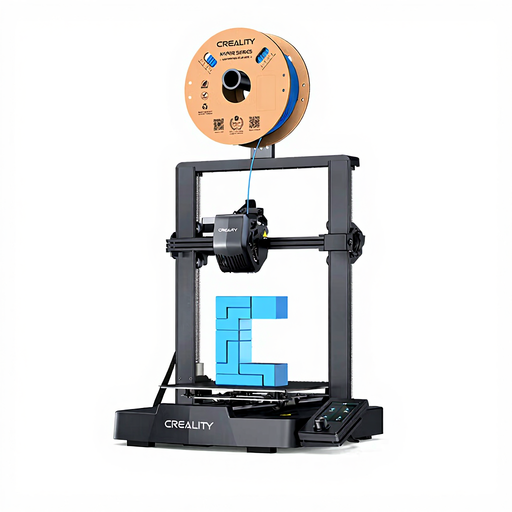
Why it stands out: The Creality Ender 3 V3 SE is the ideal entry point into the world of 3D printing. Its philosophy: maximum simplicity without sacrificing quality. Assembly is a matter of 20 minutes, tops. It comes packed with life-changing features like CR Touch automatic leveling and the famous "Sprite" Direct Drive extruder, renowned for its reliability with PLA, PETG, and even flexible filaments (TPU). With a top speed of 250?mm/s, it holds its own against more expensive models.
Highlights:
Who is it for? The quintessential beginner 3D printer. It's perfect for the curious, students, and anyone who wants to get started with a reliable, simple, and very affordable machine.
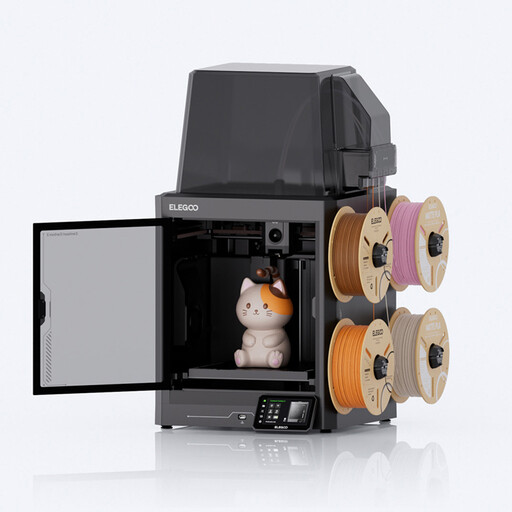
Why it stands out: This machine from Joybuy and ELEGOO plays in the big leagues. Its Core-XY architecture ensures rock-solid stability, allowing for top speeds of 500?mm/s without sacrificing precision. Its real differentiating feature: a hardened steel nozzle that heats up to 350?°C, unlocking access to a wide range of engineering filaments. Add to that a 4-colour system (CANVAS) with smart error detection and a very quiet operation (around 45?dB), and you get a machine that's perfect for a home office or workshop.
Highlights:
Who is it for? Advanced users, designers, and engineers who need a machine capable of printing technical materials for functional prototyping. Its quiet operation and multi-colour capabilities will also appeal to the most demanding creators.
Our selection is just a glimpse of what the market has to offer. Every project is unique, and your dream machine might not be on this list.
To discover a much wider selection of 3D printers, as well as filaments, resins, and accessories, feel free to explore our dedicated category.
Discover the Entire Printing Category
FDM printers, like the ones in our selection, work by depositing molten plastic filament. They are versatile, affordable, and capable of producing strong parts, making them perfect for prototyping, everyday objects, and mechanical components. Resin printers (SLA/DLP), on the other hand, use a laser or UV screen to solidify liquid resin. Their level of detail is stunning, ideal for miniatures, jewellery, or model making. The trade-off is that the parts are often more brittle, and the post-processing (cleaning and UV curing) is more involved.
Yes, without a doubt! The market has matured significantly. Today, many models are designed for newcomers: assembly in minutes, automatic bed leveling, intuitive software... The learning curve is much gentler than it used to be. A machine like the Creality Ender 3 V3 SE is a prime example of a beginner 3D printer that delivers excellent results hassle-free.
Yes, a piece of software called a "slicer" is essential. Its job is to "translate" your 3D file (usually in .STL or .3MF format) into a series of instructions the printer can understand (the famous G-code). The slicer is where you adjust all the settings: layer height, speed, temperature, infill percentage, etc. The most popular ones, like Cura, PrusaSlicer, or the manufacturers' own (Anycubic Slicer, Creality Print), are free and come with pre-optimised profiles for your machine.