
Livraison le jour même ou le lendemain

Qualité garantie

Débloquez vos offres de bienvenue: Livraison GRATUITE | Jusqu'à -80 % | 30 jours d'essai gratuits à JoyPlus
Téléchargez l'application
A mid-print failure, blurry details, a rough surface finish... These frustrations are common for many 3D printing enthusiasts. However, the solution isn't always the printer itself, but rather the ecosystem around it. Managing filament moisture and paying close attention to post-processing are two essential factors in elevating a decent part to a professional-quality result.
This guide presents a selection of 3D printer accessories designed to tackle these challenges and highlights equipment that can truly take your 3D prints to the next level.
Before making a choice, it's crucial to understand the game-changing features. Here are the key points to evaluate for a smart purchase.
Filaments like PETG, nylon, and even PLA are hygroscopic: they absorb ambient moisture. A moisture-laden filament can cause bubbles, stringing (the infamous "angel hair"), and poor layer adhesion, making your prints brittle and visually flawed.
A 3D filament dryer (or dry box) is a device that heats the spool to a controlled temperature to extract moisture. To choose wisely, take a close look at:
Once the print is finished, the work has just begun. Removing supports, smoothing surfaces, correcting minor imperfections—these finishing steps are crucial. A multifunction rotary tool is your best ally here, especially for sanding a 3D print.
Key points to watch for:
Here is our selection of products that tackle moisture management and post-processing, each with its own strengths.
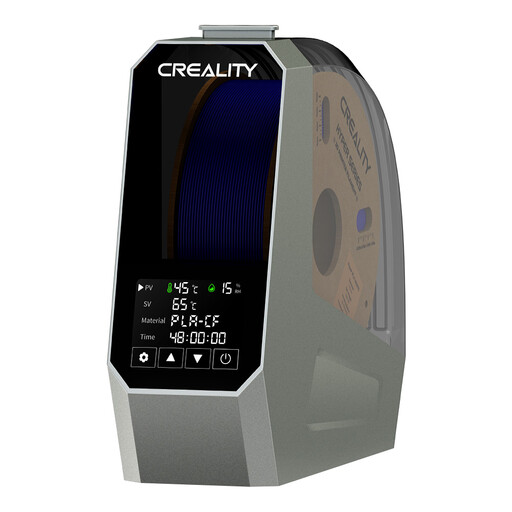
What Sets It Apart
The Creality Space Pi stands out with its 360° PTC heating, which ensures enveloping hot air circulation around the spool. This design promises uniform and rapid drying, a major advantage for materials most sensitive to moisture.
Advantages
Who Is It For? This device is an excellent option for makers and professionals who juggle hygroscopic filaments (PETG, TPU, Nylon) and are looking for a reliable single-spool solution. It's perfect for those who want to ensure consistent print quality without any unpleasant surprises.
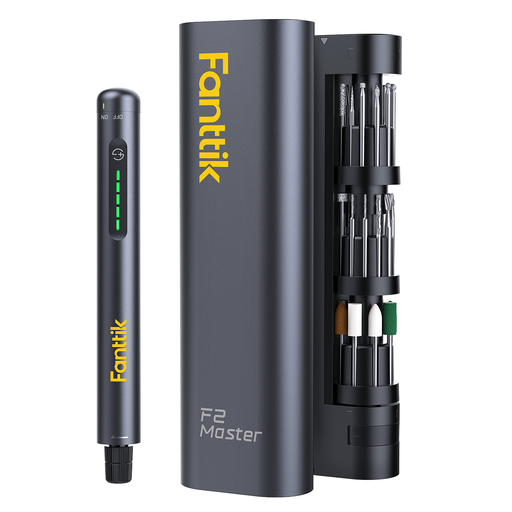
What Sets It Apart
The Fanttik F2 Master shines with its organization and portability. Its ingenious "Revostor Hub" case is a rotating magnetic stand that keeps all 35 accessories within easy reach. Its brushless motor is not only quieter but also runs much cooler than traditional brushed motors.
Advantages
Who Is It For? This tool is for creators who demand perfect finishes. It is ideal for precision sanding on 3D prints, engraving, polishing small parts, or meticulously removing supports, where maneuverability and good organization make all the difference.
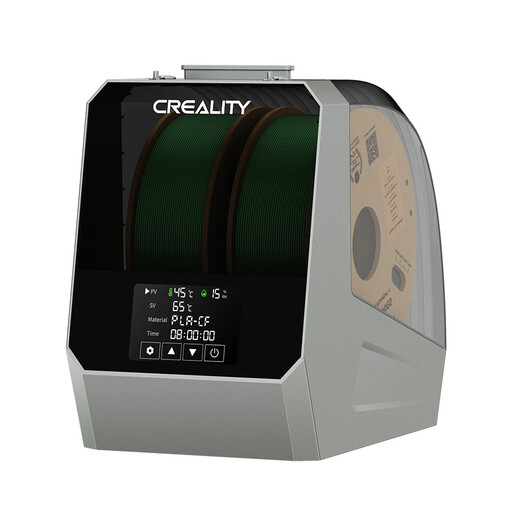
What Sets It Apart
The Creality Space Pi Plus builds on the excellent features of its smaller sibling but doubles down on capacity. Capable of holding two filament spools at the same time, it becomes a true productivity tool for multi-printer workshops or for those who frequently switch between different materials.
Advantages
Who Is It For? This "Plus" version is aimed at heavy users, small businesses, or makerspaces equipped with multiple 3D printers. Its dual capacity optimizes workflow and ensures you always have dry filament on hand.
Our selection focuses on moisture management and post-processing, but the world of 3D printer accessories is much larger. If you're looking for nozzles, print beds, extruders, or other components to customize or repair your machine, feel free to explore our full catalog.
? Discover Our Full Range of 3D Parts
1. Why is my filament brittle and producing poor-quality prints? Brittle filament is a classic symptom of a material that has absorbed too much moisture. When it hits the hot nozzle, the water in the plastic vaporizes, creating micro-bubbles that weaken the object's structure and cause surface defects (crackling, under-extrusion). Using a dry box is the most effective solution to restore its original properties.
2. How can I improve the surface finish of my 3D prints? Post-processing is key. For FDM prints, careful sanding can erase layer lines. A multifunction rotary tool, equipped with sanding and polishing bits, allows you to achieve a perfectly smooth surface quickly and with control. The golden rule: start with a coarse grit, then gradually move to finer grits for a flawless result.
3. Is a filament dryer really necessary for PLA? Although PLA is known to be less sensitive to moisture than PETG or TPU, it is not completely immune. In a humid environment, even PLA can absorb enough water to degrade print quality (e.g., a "hairy" appearance or stringing, a grainy surface). To guarantee impeccable and consistent quality, especially if you live in a humid region or if your spools are stored in the open, a dryer remains a very worthwhile investment to take your 3D prints to the next level.