
Livraison le jour même ou le lendemain

Qualité garantie

Débloquez vos offres de bienvenue: Livraison GRATUITE | Jusqu'à -80 % | 30 jours d'essai gratuits à JoyPlus
Téléchargez l'application
A 360 mm AIO water cooler for your processor is designed for those who want to keep their CPU cool during long gaming sessions, video editing or 3D rendering. With its three fans and large radiator, this format can fit into many builds — provided you check a few points before placing your order.
Aesthetics also play a part in your choice: ARGB fans, a pump with an LCD screen, a customisable AMOLED panel or even glasses-free 3D effects are now available on certain models. That’s great for showing off a glass-panelled case, but these features shouldn’t make you forget what really matters: performance, compatibility and noise levels.
The phrase “compatible with Intel and AMD” doesn’t mean the radiator will fit in any case. A 360 mm model is typically around 400 mm long once you account for the fans and fittings. So you need to check for a suitable top or front mounting position, as well as clearance around the memory and graphics card.
On the processor side, check which sockets are supported. The models featured here are compatible with Intel LGA 1851 and LGA 1700, as well as AMD AM5 and AM4. Some references also support Intel LGA 1200 and LGA 115X sockets.
A pump with an LCD screen, a customisable AMOLED panel or ARGB lighting can add real character to a build. However, these features often push up the price and sometimes require dedicated software. Before choosing based on looks, also consider the radiator design, fan speed, PWM control and overall dimensions.
Glasses-free 3D effects are primarily decorative. Their appearance varies depending on the viewing angle, the content displayed and software integration. On their own, they tell you nothing about cooling performance.
An AIO system is usually sealed and doesn’t need regular refilling. That doesn’t mean you can skip basic maintenance: dusting the radiator and fans, listening for unusual pump noises and regularly checking temperatures. Overly bent tubes or a poorly ventilated radiator can also affect your experience.
A thick radiator potentially offers a larger heat-exchange surface, but it also takes up more space. Check its length, width, total thickness with fans and compatibility with your case. In a compact build, a 240 mm or 280 mm model may be easier to install.
PWM fans adjust their speed based on the processor temperature. Airflow, measured in CFM, and static pressure, measured in mmAq, provide useful indicators — as long as you compare measurements taken under similar conditions. For example, the LE100 360 spec sheet states 81.8 CFM, 3.2 mmAq and a maximum speed of 2,500 rpm.
Higher speeds help expel heat, but they can also increase noise. For a gaming PC used for several hours at a time, go for precise PWM control and well-tuned fan curves.
Before ordering, make sure the kit includes the correct mounting system for your motherboard. Support for Intel LGA 1851/1700 and AMD AM5/AM4 sockets covers a wide range of recent and older builds, but you should always confirm the accessories are included on the product page.
Also plan for the various connections: pump power, fan headers, ARGB connector and, depending on the model, a USB cable for the screen. A motherboard with an ARGB header or suitable connector will make installation much simpler.
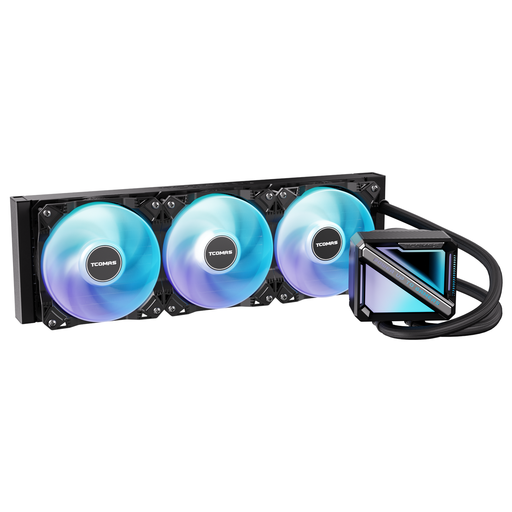
Why this choice suits this profile: This 360 mm liquid cooling kit keeps things simple with a clean design, a square pump with ARGB backlighting and no screen to configure. It’s a solid starting point for a first installation in a black case with a glass front panel.
The spec sheet states compatibility with Intel LGA 1851/1700 and AMD AM5/AM4 sockets. Still, check the available space in your case before buying.
360 mm radiator, square pump with ARGB lighting and support for multiple Intel and AMD sockets.
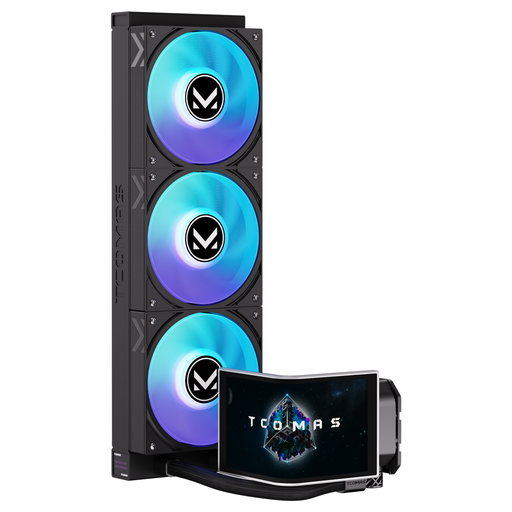
Why this choice suits this profile: With its 16.94 cm curved AMOLED screen and customisation options, this model is aimed at builds where the display is part of the show — especially a gaming PC sat proudly on a desk.
The screen and glasses-free 3D effects are presented as display features, not as temperature or performance indicators.
16.94 cm curved AMOLED screen, customisable display, ARGB fans and compatibility with Intel LGA 1851/1700 and AMD AM5/AM4.
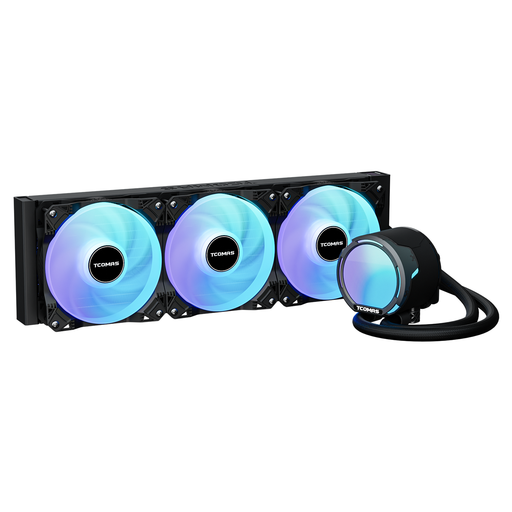
Why this choice suits this profile: Content creators and gamers who push their processor for long periods will be interested in its stated airflow and static pressure values.
The spec sheet gives precise figures — 2,500 rpm, 81.8 CFM and 3.2 mmAq — to compare against your processor’s needs and case ventilation.
FOC three-phase pump, PWM fans rated at 2,500 rpm and compatibility with Intel LGA 1851/1700/1200/115X and AMD AM5/AM4.
We’ve put together a comprehensive, real-time list of products that meet these demanding selection criteria and European safety standards.
Before you start, check the radiator orientation and the direction of airflow. At the front, the fans can be set to intake or exhaust depending on the overall balance you want for your case. Tighten the pump gradually and never force the tubes.
Power consumption mainly comes from the pump, fans and lighting. A well-tuned PWM curve prevents unnecessary speed increases when the system is idle. If the model supports it, connect the ARGB and screen separately so you don’t draw all the power from a single connector.
No. The radiator size alone doesn’t guarantee compatibility. You need to check the socket, the mounting system supplied, the processor’s thermal output and the available space in your case. The models mentioned support Intel LGA 1851/1700 and AMD AM5/AM4 sockets, with differences depending on the reference.
It depends on component quality, usage intensity, dust build-up and the thermal environment. Keep an eye on temperatures, vibrations and any unusual pump noises. Regular dusting of the radiator and fans helps maintain stable operation, though no precise lifespan can be guaranteed.
No. The screen is for displaying information or decorative content. Cooling performance depends primarily on the radiator, pump, contact with the processor, fans and airflow inside the case. These elements should be evaluated separately before choosing a gaming water cooler.