
Livraison le jour même ou le lendemain

Qualité garantie

Débloquez vos offres de bienvenue: Livraison GRATUITE | Jusqu'à -80 % | 30 jours d'essai gratuits à JoyPlus
Téléchargez l'application
A 360 mm AIO liquid CPU cooler can be an excellent choice for a gaming PC, a content creation workstation, or a build with a recent processor. But the radiator's length alone doesn't guarantee a successful installation. Socket compatibility, case placement, noise levels, and any display features are all points to check before you place your order.
Here are the most common pitfalls to avoid, along with a selection of models suited to different needs.
A model may support a given socket without being compatible with every case or motherboard. Whether you're looking for an Intel LGA1851 water cooler, an Intel LGA1700 water cooler, an AMD AM5 water cooler, or an AMD AM4 water cooler, check the following:
The models featured here claim compatibility with Intel LGA1851, LGA1700, and several older sockets, as well as AMD AM5 and AM4. However, you should always cross-reference this with the manufacturer's manual and your PC's exact configuration.
A 360 mm radiator typically accommodates three 120 mm fans. In practice, the block's dimensions, the tubing length, and the overall thickness of the radiator can significantly reduce the available clearance.
Before ordering a all-in-one CPU cooler, measure:
Mounting the radiator at the front can also alter the airflow inside the case. Installing it on the top often helps exhaust heat more effectively, but this depends on the case width and the height of components around the CPU.
The maximum fan speed, expressed in RPM, isn't enough to determine a system's behaviour. Airflow, static pressure, PWM control, and the fan curve all matter just as much.
The LE100 360, for example, claims up to 2,500 RPM, an airflow of 81.8 CFM, and a static pressure of 3.2 mmAq. These figures are useful for comparing spec sheets, but they don't accurately predict the noise level once the kit is installed in your case. A high speed can also mean more noise if the PWM curve is set too aggressively.
For a recent Intel processor, look specifically for LGA1851 support. For previous generations, LGA1700 compatibility may be essential. On the AMD side, AM5 and AM4 sockets shouldn't be confused with older mounting systems.
If you're replacing an existing cooler, also check whether the motherboard's backplate needs to be removed. This can extend the installation time and make access inside the case more difficult.
A 360 mm AIO system usually includes a 360 mm radiator and three 120 mm fans. PWM support allows the motherboard to automatically adjust fan speed based on the CPU temperature.
For gaming water cooling, this regulation keeps things quiet on the desktop, then ramps up the cooling during a game or video render. Also check the required connectors: pump power, fans, and ARGB lighting may need separate connections.
A 360 mm ARGB AIO can match the colours of your other components, provided your motherboard or controller is compatible. However, it's important to distinguish fan lighting from a CPU cooler with a screen.
The screen built into the pump can display system information or custom visuals. It may require an internal USB cable and dedicated software. This is worth checking carefully if your case has few internal connectors or if you prefer to keep background applications to a minimum.
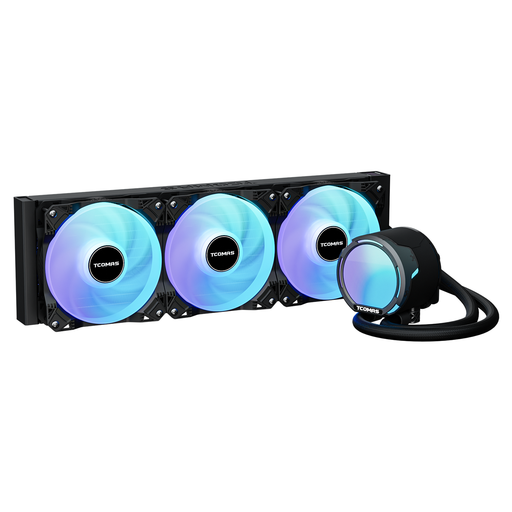
Why this suits this profile: This model covers the essential features of a 360 mm CPU water cooler, with claimed compatibility for Intel LGA1851/LGA1700 and AMD AM5/AM4. Its black finish blends easily into most cases.
The airflow, pressure, and speed data are clearly listed on the product page. A good point for comparing performance beyond just ARGB appeal.
Full-coverage ARGB lighting, three-phase pump, and PWM fans rated up to 2,500 RPM.
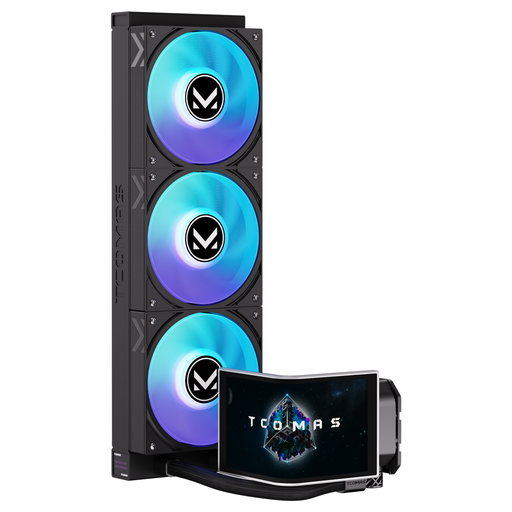
Why this suits this profile: Its 6.67-inch curved AMOLED display is aimed at builds where looks and customisation matter as much as cooling.
The screen and visual effects are advertised as customisable. Still, check the required software and USB connections before you start the installation.
6.67-inch curved AMOLED display, 3D effects, and support for Intel LGA1851/LGA1700 as well as AMD AM5/AM4.
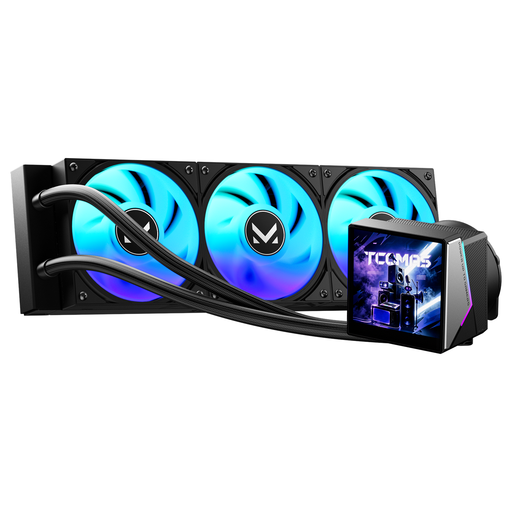
Why this suits this profile: Its 3.95-inch IPS display is aimed at users who want to check information directly on the pump head during a gaming session or demanding task.
The screen is clearly separate from the ARGB lighting. Remember to check the clearance above the motherboard and the availability of an internal USB connector.
3.95-inch IPS display, dynamic ARGB lighting, and claimed compatibility with recent Intel and AMD sockets.
We've put together a comprehensive, real-time updated selection of products that meet these demanding criteria and European safety standards.
Before you start the installation, remove the protective film from the base of the block and apply the thermal paste as instructed. Then tighten the screws gradually, alternating sides, to distribute the pressure evenly across the processor.
To keep it running optimally:
The system's lifespan depends on component quality, the environment, and maintenance. The pump or a fan may reach its limits before other parts. A persistent rise in temperatures or an unusual noise should prompt you to check the installation and connections.
No. You need to check the socket, the included mounting system, and the thermal dissipation level required by your processor. The models in this selection claim compatibility with Intel LGA1851/LGA1700 and AMD AM5/AM4, but the case remains a deciding factor.
The power consumption mainly comes from the pump, fans, and any lighting. It's generally marginal compared to the CPU and graphics card. However, the number of fans and the presence of an integrated screen can add a few extra connections and a small amount of additional power draw.
Not necessarily. The screen mainly adds a visual feature and can display information or images, depending on the model. If your priority is temperature control, focus first on compatibility, radiator placement, PWM control, and airflow inside the case.