
Livraison le jour même ou le lendemain

Qualité garantie

Débloquez vos offres de bienvenue: Livraison GRATUITE | Jusqu'à -80 % | 30 jours d'essai gratuits à JoyPlus
Téléchargez l'application
Choosing the right CPU liquid cooling system is a crucial step in building a truly high-performance PC. To tame the heat from high-end processors, a 360mm AIO liquid cooler is often the go-to solution for both intensive gaming and demanding creative applications. The problem? The market is flooded with models making alluring marketing promises, and it's easy to be tempted by a product that will ultimately disappoint.
As a product expert at Joybuy, my role is to help you navigate the options. Here are the 3 common pitfalls to avoid and the essential criteria for making the right choice with confidence.
To avoid falling for the marketing hype, get back to basics. Here are the three non-negotiable checkpoints for a high-performance, long-lasting AIO.
The pump is the core component of your AIO. Its job is to ensure constant liquid circulation between the waterblock (mounted on the CPU) and the radiator.
Your AIO is an investment; it should be built to last. It's crucial to verify that the kit is compatible with AM5 and LGA1851 sockets. These are the current and upcoming platforms from AMD and Intel. A compatible kit ensures you can reuse it for a future CPU upgrade without having to buy a whole new cooler.
Aesthetics are great, but they should never come at the expense of practicality.
To help you decide, here are a few models that perfectly illustrate these criteria and cater to specific needs.
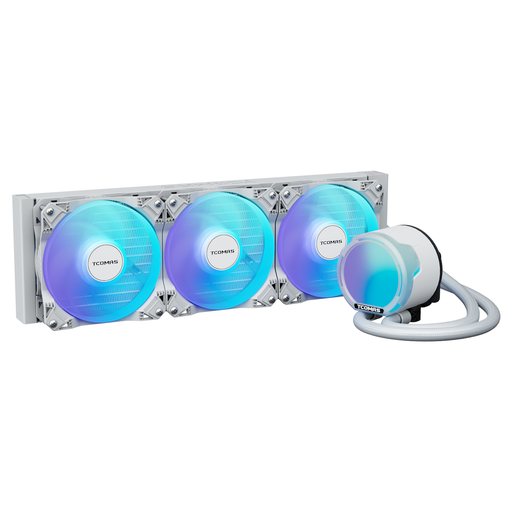
The right fit: Ideal for those who want the raw performance of a 360mm cooler and a clean ARGB aesthetic, without the extra cost of an LCD screen. This model gets straight to the point: cooling, and doing it well.
No gimmicky screen here. The investment is focused on a high-performance FOC 3-phase pump and PWM fans for maximum, no-frills efficiency.
Efficient and quiet FOC pump. High static pressure (3.2 mmAq) and high airflow (81.8 CFM) fans for formidable thermal dissipation.
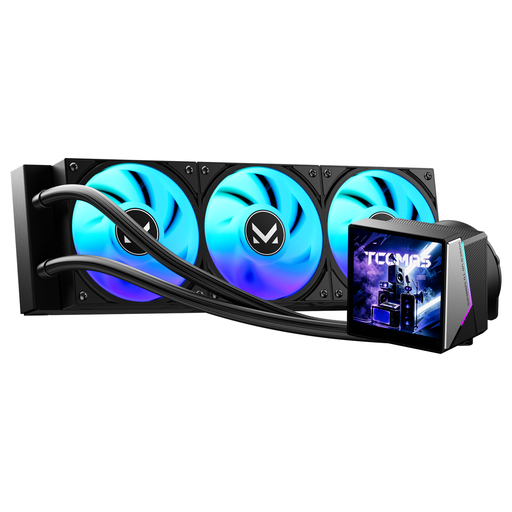
The right fit: For those who want to turn their PC into a true work of art. Its large 3.95-inch IPS screen is perfect for displaying system stats, GIFs, or images, becoming the centrepiece of the build.
It doesn't sacrifice performance for the sake of aesthetics. By combining a large screen with powerful cooling, it successfully delivers the best of both worlds.
Large 3.95-inch IPS screen for advanced monitoring and visual customisation. Dynamic ARGB lighting for perfect synchronisation with the rest of your setup.
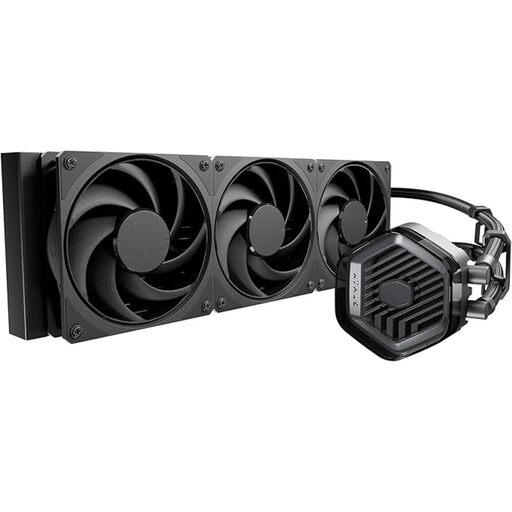
The right fit: Ideal for *all-black* or *stealth* builds, where raw performance takes priority over lighting effects. Its completely black design, with no RGB whatsoever, focuses on powerful and silent cooling.
By skipping RGB entirely, it avoids the software headache. The priority is on quality components: a patented dual-chamber pump and excellent pre-installed Mobius fans.
Maximum cooling with zero visual distractions. Eco-friendly design (recycled materials, reduced packaging) and a solid 5-year warranty.
We have selected a full range of products that meet these criteria for quality and performance.
On average, a good quality AIO can run without issues for 5 to 7 years. The weakest link is usually the pump, which is the component most likely to fail over time. A long warranty (5 years or more) is therefore an excellent indicator of the product's reliability and the manufacturer's confidence in it. Note that very slow liquid evaporation (called permeation) is a normal phenomenon over several years and is not considered a defect.
No, modern kits are increasingly easy to install. The main challenge is physical: case compatibility. Make sure your case has a dedicated 360mm mounting location (top, front, or side). Cable management can also require some patience, but that's part and parcel of any clean PC build. Finally, always double-check that your socket (e.g., AM5 or LGA1851) is compatible with the provided mounting hardware.
Noise comes from two sources: the pump and the fans. A quality pump should be nearly inaudible at idle. Fan noise, on the other hand, depends on their rotational speed (RPM). This is why you should prioritise models with PWM fans. They allow you to create custom fan curves (in the BIOS or via software) to find the ideal balance between cooling efficiency and quiet operation.