
Livraison le jour même ou le lendemain

Qualité garantie

Débloquez vos offres de bienvenue: Livraison GRATUITE | Jusqu'à -80 % | 30 jours d'essai gratuits à JoyPlus
Téléchargez l'application
Whether you want to keep an eye on your home, children, or pets, peace of mind is essential. A 360° indoor Wi-Fi security camera is a simple and effective solution for watching over your household. Smart and connected, it lets you see what’s happening in real time, wherever you are, directly from your smartphone.
With the jungle of available models, it can be tough to know where to start. This guide breaks down the essential criteria and presents a selection of products to help you make the right choice.
To ensure you make the right decision, let's review the features that truly matter for daily use. Here are the key points to consider before making your choice.
This is the most critical aspect: good image quality is essential for clearly identifying details. A 2K (sometimes called 2.5K) or 4K resolution offers much greater sharpness than the Full HD (1080p) standard. This is a real advantage for zooming in on a specific area without the image turning into a pixelated mess.
Another major advancement is colour night vision. Gone are the grainy black-and-white images of classic infrared! Thanks to more sensitive sensors and sometimes small, integrated spotlights, it can capture full-colour images even in low light. This is a huge plus for more easily identifying a face or an item of clothing.
Modern cameras do more than just detect simple motion. Thanks to artificial intelligence, they can now differentiate between a human, a pet, and even recognise specific sounds like a baby crying. The benefit? No more false alerts triggered by a fly passing by or a simple change in lighting. You only receive notifications when it really matters.
Auto-tracking is another handy feature: the camera automatically pans and tilts to follow a person or pet in motion, ensuring nothing leaves the frame.
To record videos, you generally have two options:
Also, remember to check compatibility with your Wi-Fi network (2.4 GHz, 5 GHz, or both) and its potential integration into your smart home ecosystem, especially if you use voice assistants like Alexa.
Now for our selection. Here are three models that caught our attention for their features and value for money.
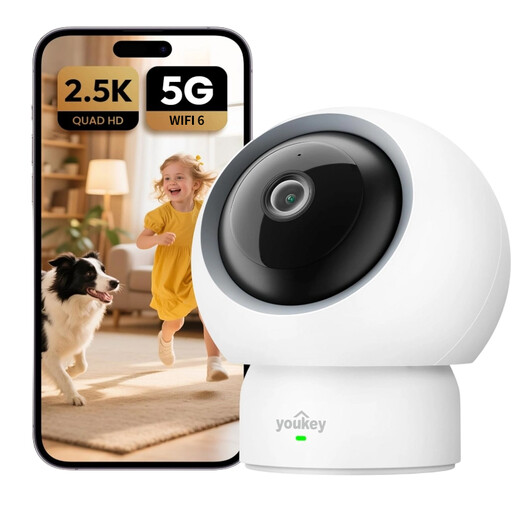
What sets it apart The Youkey P310 was designed with families in mind. Its baby cry detection feature turns it into a highly effective video baby monitor. Its dual-band Wi-Fi 6 connectivity ensures a stable and fast connection, while its 2.5K resolution guarantees crystal-clear images.
Pros
Who is it for? Ideal for new parents looking for a modern, connected baby monitor, as well as for pet owners who want to keep an eye on their furry friends and interact with them remotely.
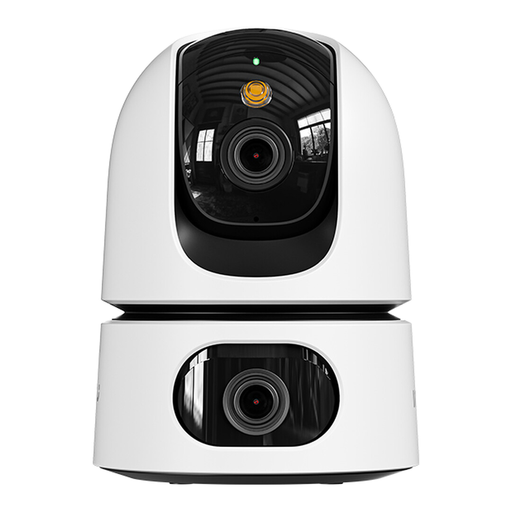
What sets it apart This model innovates with its dual-lens design. A fixed lens monitors a critical area (like an entryway), while a second motorised Pan & Tilt lens patrols the rest of the room. This unique setup allows you to cover two zones simultaneously for total surveillance with no blind spots.
Pros
Who is it for? Perfect for those who want to monitor a large room or two adjacent areas with a single camera. Its dual-lens design makes it a particularly comprehensive and effective surveillance solution.

What sets it apart The JOOAN camera stands out with its built-in 2.8-inch screen and two-way video calling feature. A person near the camera can initiate a video call to a smartphone with a single click, turning the camera into a true family video phone.
Pros
Who is it for? An excellent option for families who want a simple way to stay in touch with children or elderly relatives. The screen and one-click calling feature go beyond simple surveillance, making it a genuine communication tool.
Our selection focuses on models with distinct profiles, but the market is full of solutions. To discover a wider range of products with different resolutions, designs, or features, take a look at our complete category.
? Discover all our Wi-Fi Security Cameras
1. Can an indoor security camera work without a subscription? Yes, absolutely. Many cameras, including those in our selection, work perfectly without a subscription. They record videos locally to a microSD card. Cloud storage remains an option, usually paid, for those who want an off-site backup of their data.
2. How is my data privacy ensured? This is a crucial question. Manufacturers integrate several safeguards to protect your privacy. Privacy mode, for example, allows you to physically cover the lens or stop recording with a single tap in the app. On your end, be sure to secure your Wi-Fi network with a strong password and enable two-factor authentication on your user account.
3. Is installing a 360° Wi-Fi camera complicated? No, rest assured: installation is incredibly simple and requires no technical skills. Generally, you just need to: