
Livraison le jour même ou le lendemain

Qualité garantie

Débloquez vos offres de bienvenue: Livraison GRATUITE | Jusqu'à -80 % | 30 jours d'essai gratuits à JoyPlus
Téléchargez l'application
For a gaming PC, creative workstation or streaming-focused setup, 32 GB 6000 MHz DDR5 RAM offers an excellent balance. It is usually a 2 x 16 GB DDR5 memory kit, designed to run in dual-channel mode on a compatible motherboard.
However, a high frequency does not guarantee trouble-free installation or consistent performance. Overclocking profiles, latency, heatsink height and motherboard compatibility are all factors you need to check to avoid unpleasant surprises and unnecessary expense.
Product listings often show 6000 MHz, even though DDR5 memory is technically specified as 6000 MT/s. This difference in terminology does not affect your choice of kit, but it highlights an important point: the advertised speed may not be active from the very first boot.
Many kits start with a more conservative JEDEC profile, such as 4800 MT/s at 1.1 V. To reach the advertised speed, you need to activate the AMD EXPO or Intel XMP 3.0 profile in the motherboard’s UEFI.
Two kits rated at 6000 MT/s can offer different access times. CL30 DDR5 has lower CAS latency than CL36 DDR5 at a comparable frequency. That does not make CL36 unusable, however: the real-world difference depends on the processor, games, applications and the PC’s overall settings.
The best approach is to compare the complete combination of frequency + timings + compatibility, rather than focusing solely on the number 6000.
Heatsinks and RGB lighting can increase the height of the modules. A 42.23 mm module, such as the Kingston FURY Beast RGB, may reduce the available space beneath some large air coolers.
In a compact build, a low-profile 32 mm model, such as the white Crucial Pro DDR5, will make installation easier. You should also check the motherboard’s compatibility list and the dimensions of the CPU cooler.
For recent games, video editing, streaming and multitasking, 32 GB provides comfortable headroom for most configurations. A 2 x 16 GB kit will generally let you take advantage of dual-channel mode, provided you install the modules in the recommended slots, usually A2 and B2.
Avoid combining two different kits to reach 32 or 64 GB without first checking their compatibility. Different chips, voltages or timings may force the motherboard to lower the frequency or even cause instability.
Recent AMD Ryzen platforms generally use AMD EXPO, while Intel motherboards support Intel XMP 3.0. Some kits, such as the Kingston FURY Beast DDR5, are compatible with both profiles.
This dual compatibility is a real advantage for PC builders or users who may switch platforms. It does not remove the need to check the exact motherboard model, BIOS version and the manufacturer’s QVL.
A CL30 rating is often preferred for a gaming build using DDR5-6000 MT/s. A CL36 kit may nevertheless be a suitable alternative depending on its price and intended use. You should also take the profile voltage into account when configuring the motherboard; it is generally around 1.35 V.
DDR5 modules include a power management circuit, known as a PMIC, along with features such as on-die ECC. These describe the memory’s architecture, but they do not turn a consumer DIMM kit into genuine server-grade ECC memory.
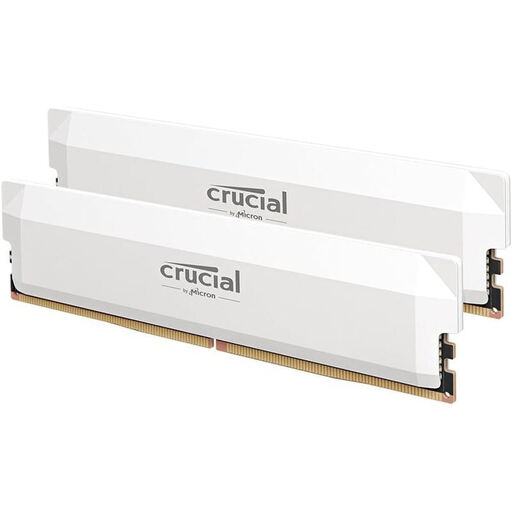
Why this choice suits this user profile : this kit offers 32 GB split across two 16 GB modules, a speed of 6000 MT/s and a design that is easy to integrate into a home or gaming setup. Its 32 mm white heatsink is particularly well suited to cases fitted with a large CPU cooler.
The listing clearly specifies the XMP 3.0 and AMD EXPO profiles, the 1.35 V profile voltage and the CL36-38-38-80 timings. This lets you compare concrete specifications instead of relying on a simple speed claim.
Low-profile 32 mm design, 32 GB dual-channel memory, AMD EXPO and Intel XMP 3.0 profiles, white aluminium heatsink.
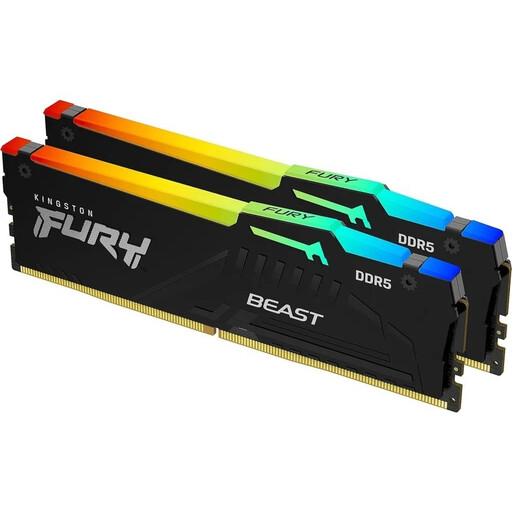
Why this choice suits this user profile : this kit is aimed at gaming builds where CL30 latency, overclocking profiles and RGB lighting all play a part in component selection.
The listing clearly distinguishes the 4800 MT/s SPD setting from the EXPO/XMP profiles, which can reach 6000 MT/s. The 42.23 mm height is also specified, allowing you to check the available space around the CPU cooler.
32 GB, 6000 MT/s, CL30-36-36 timings, XMP 3.0 and EXPO compatibility, RGB lighting that can be synchronised with several motherboard software suites.
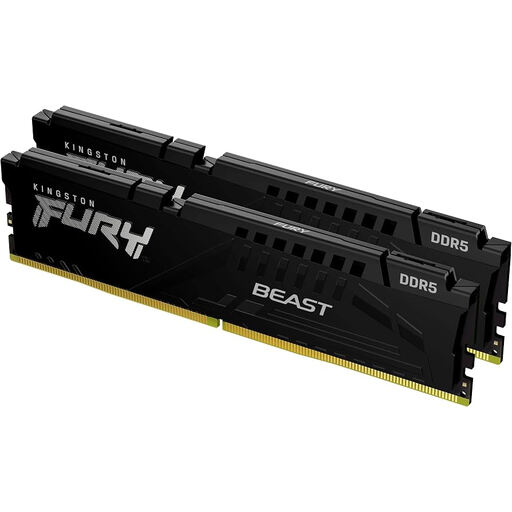
Why this choice suits this user profile : its understated design suits content creators, streamers and users who prioritise memory settings, case airflow and system stability over lighting effects.
The capacity, 2 x 16 GB configuration, CL30 latency and 1.35 V voltage are clearly detailed. Compatibility with AMD EXPO and Intel XMP 3.0 also reduces the risk of choosing a profile suited to just one platform.
On-die ECC, two 32-bit sub-channels, integrated PMIC, heatsink and compatibility with gaming, live streaming and 3D rendering.
We have put together a complete, real-time updated list of products that fully meet these strict selection criteria and European safety regulations.
Before handling the modules, shut down the computer completely, unplug the mains cable and discharge any static electricity by touching an earthed metal surface. Then insert the modules into the slots recommended in the motherboard manual.
After starting the PC, open the UEFI and enable EXPO on an AMD platform or XMP 3.0 on an Intel platform. If the system becomes unstable, revert to the previous setting, update the BIOS and check the kit’s compatibility. Good case airflow remains essential, especially when the profile voltage is higher than the JEDEC setting.
No. The motherboard must support DDR5, the target speed and the selected profile. The processor can also affect the frequency that remains stable in practice. Check the motherboard manual and the manufacturer’s QVL before buying.
CL30 offers lower nominal latency at a comparable frequency, which may appeal to gamers and users who pay close attention to settings. CL36 remains perfectly suitable for a versatile build, particularly if its price, height and compatibility are a better match for your plans.
Its lifespan depends on the quality of the components, the temperature inside the case, the voltage applied and how the modules are handled. Follow the voltage recommendations provided by the manufacturer, avoid forcing the modules into place and protect them from static electricity.