
Livraison le jour même ou le lendemain

Qualité garantie

Débloquez vos offres de bienvenue: Livraison GRATUITE | Jusqu'à -80 % | 30 jours d'essai gratuits à JoyPlus
Téléchargez l'application
Choosing a gaming monitor is the final, yet crucial, touch for any great PC setup. This is especially true when you're aiming for the popular 27-inch QHD combo, which many consider the perfect sweet spot. But navigating lengthy spec sheets and marketing jargon can be a challenge. A 27-inch QHD gaming monitor is an excellent investment, provided you choose the right model.
In this guide, we'll break down the features that truly matter and present our selection of the best monitors for 2026. Our goal is to help you find that perfect fit—the one that will elevate your favourite games without breaking the bank.
Before diving into our top picks, let's review the key technical points you need to master to make an informed decision.
For a fluid and responsive image, two numbers stand above all others:
The panel is the engine of your monitor. It dictates the image quality.
Screen tearing, the immersion-breaking visual artifact, is the gamer's worst enemy. To eliminate it, there's only one solution: adaptive sync. AMD offers its FreeSync technology (often in a FreeSync Premium monitor version), while NVIDIA has G-Sync. The good news? Most monitors today are "G-Sync Compatible," meaning they work with cards from both brands to ensure perfect synchronisation between the GPU and the monitor.
Enough theory, let's get practical. Here are the models that caught our attention for their performance-to-price ratio and well-thought-out features.
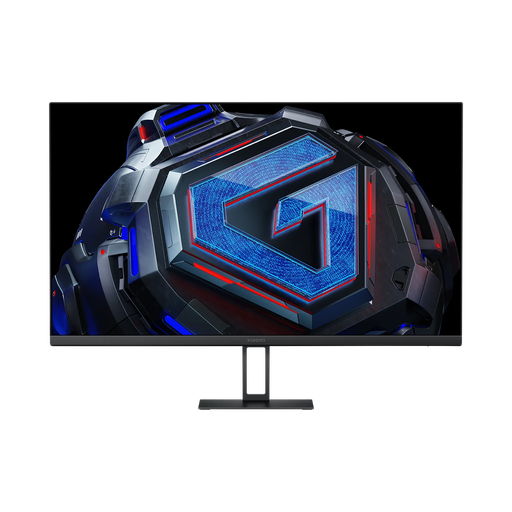
Highlights This Xiaomi monitor checks all the right boxes at a very competitive price point. It features a highly responsive Fast IPS panel in QHD (2560x1440), running at 180Hz with a 1ms response time. The icing on the cake is its excellent colour accuracy (95% DCI-P3 and ΔE<2), which makes it just as capable for content creation as it is for gaming.
Advantages
Who is it for? The versatile gamer who wants a high-performing monitor on all fronts, from fast-paced FPS to immersive RPGs, without sacrificing image quality for other activities (photo, video, etc.).
See details for the Xiaomi G27Qi
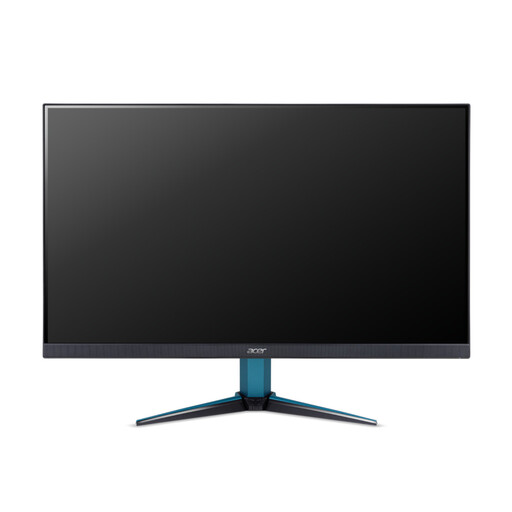
Highlights Acer makes its mark in the highly competitive fast IPS segment with the Nitro VG271UM3. It boasts a nearly identical spec sheet: a 27-inch WQHD IPS panel, a 180 Hz refresh rate, and a 1 ms (GtG) response time. It stands out with its AMD FreeSync Premium certification, a guarantee of perfect fluidity for owners of AMD graphics cards.
Advantages
Who is it for? Ideal for gamers, especially those with AMD systems, who are looking for a reliable and ultra-responsive 27-inch gaming monitor for action games and FPS, where every millisecond counts.
Discover the Acer Nitro VG271UM3
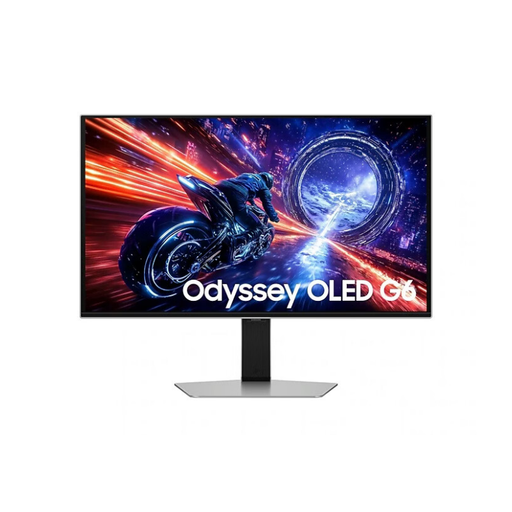
Highlights With the Odyssey G6, Samsung is in a league of its own. Its QD-OLED panel ensures infinite contrast and explosive colours, but its real showstopper is its raw performance: a stratospheric 500 Hz refresh rate and a 0.03 ms (GTG) response time. This is a monitor built for top-tier esports, where every microsecond counts. The VESA DisplayHDR True Black 500 certification also guarantees a first-class HDR experience.
Advantages
Who is it for? For the pro gamer or the hardcore competitor seeking a decisive edge. It's also the holy grail for tech enthusiasts who want the absolute best of the best, for both gaming and HDR multimedia content. Its reputation for pure performance as a 2K gaming monitor is second to none.
View the specs for the Samsung Odyssey OLED G6
Our selection focuses on the 27-inch QHD format, but the world of monitors is vast! If you're looking for a different size, a different resolution, or a specific technology, feel free to explore our complete catalogue.
Discover our full range of ultra-sharp monitors
1. Is a 27-inch QHD monitor a good choice for gaming? Absolutely! It's the current sweet spot. The 27-inch size is immersive without being overwhelming. The QHD (2560x1440) resolution offers a spectacular sharpness boost over Full HD, without requiring a prohibitively expensive graphics card like 4K does. It's the best compromise between performance and visual quality right now.
2. What is the perceptible difference between 144 Hz and 180 Hz? Both refresh rates offer incomparable fluidity compared to an old 60 Hz screen. The jump from 144 Hz to 180 Hz provides a small gain in motion clarity. Will everyone notice it? Probably not. But for an FPS or racing game player looking to optimise their performance, this little extra can make a difference.
3. Do I really need G-Sync or FreeSync? Yes, it's essential for a good gaming experience. These technologies force your monitor to synchronise with the number of frames sent by your graphics card. The result: goodbye to screen tearing and micro-stuttering that ruin everything. The image is perfectly smooth and stable—it's a night and day difference.