
Livraison le jour même ou le lendemain

Qualité garantie

Débloquez vos offres de bienvenue: Livraison GRATUITE | Jusqu'à -80 % | 30 jours d'essai gratuits à JoyPlus
Téléchargez l'application
For a gamer, every millisecond counts! A smooth, responsive display can be the difference between victory and defeat, especially in competitive games. Lost in the jungle of tech specs (refresh rate, response time, panel type…), choosing a 27-inch curved gaming monitor can quickly become a headache.
As a product recommendation expert at Joybuy, my mission is to help you make sense of it all. This guide breaks down the essential features and presents a selection of monitors that meet the expectations of gamers in 2026, whether you're an e-sports competitor or a casual player looking for immersive experiences.
Before taking the plunge, let's review the key concepts that will determine the performance of your future monitor.
The smoothness of an image directly depends on its refresh rate, measured in Hertz (Hz). A 144Hz gaming monitor displays 144 frames per second, offering motion clarity that is a world apart from a standard 60?Hz screen. For fans of FPS or racing games, a high refresh rate is a decisive advantage. Some models even go up to 240Hz or more for absolute fluidity.
Response time, measured in milliseconds (ms), indicates how quickly a pixel changes colour. A low response time, ideally 1ms, reduces motion blur (ghosting), ensuring that fast-paced action remains perfectly sharp.
Most curved gaming monitors use a VA (Vertical Alignment) panel. This panel type is favoured for its excellent contrast ratio, which translates into deep blacks and vibrant colours, enhancing immersion.
The curvature, often indicated by a value like 1500R or 1800R, is designed to match the natural field of view of the human eye. A 1500R curved screen provides a wraparound feeling that pulls you into the heart of the action, while also reducing eye strain during long gaming sessions. On a 27-inch display, Full HD (1920x1080p) resolution remains a smart choice, as it makes it easier to achieve a high framerate with most current graphics cards.
Ensure the monitor has the right connections (DisplayPort and HDMI). DisplayPort is often essential to take advantage of the highest refresh rates. AMD FreeSync technology (or G-Sync for NVIDIA cards) synchronises the monitor's refresh rate with your graphics card's, eliminating screen tearing for perfectly smooth visuals. Many monitors are also PS5 and Xbox Series X/S compatible, although the maximum refresh rate may be limited by the HDMI port.
Here are three models that stand out for their technical specifications and market positioning, designed to suit different types of gamers.
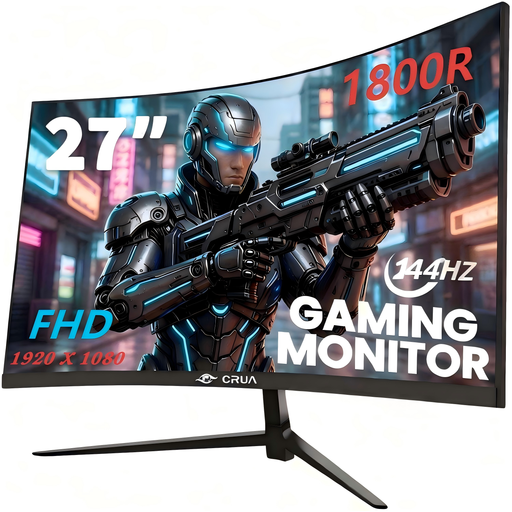
Highlights
The CRUA 27" monitor is an excellent entry point into the world of high-refresh-rate gaming. It checks all the essential boxes for a smooth gaming experience: Full HD resolution, a 144Hz refresh rate, and AMD FreeSync technology. Its 1800R curvature and VA panel ensure good immersion and very decent contrast.
Advantages
Who is it for? This monitor is the ideal option for gamers who want to make the leap to 144?Hz without breaking the bank. It's perfect for adventure games, RPGs, and occasional competitive gaming sessions.
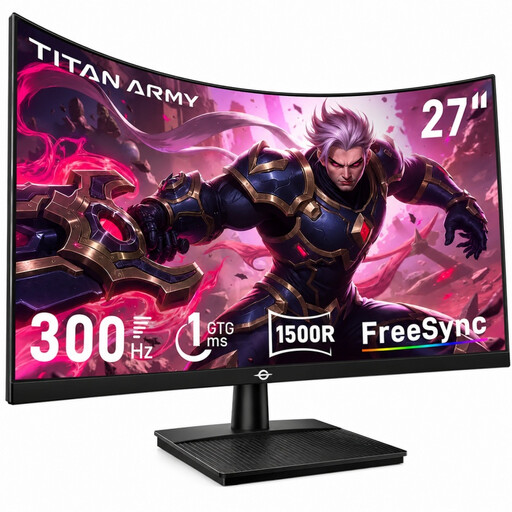
Highlights
The TITAN ARMY C27A1H is aimed at true competitors. With a staggering 300 Hz refresh rate and a 1ms (GTG) response time, this monitor is built for pure performance. Its 1500R curvature and VA panel with a 4000:1 contrast ratio guarantee deep immersion and intense blacks, while its wide colour gamut ensures a spectacular image.
Advantages
Who is it for? Ideal for e-sports players and hardcore FPS fans (Counter-Strike, Valorant, Apex Legends) looking to gain every competitive edge. Its extreme responsiveness and fluidity are entirely dedicated to performance.
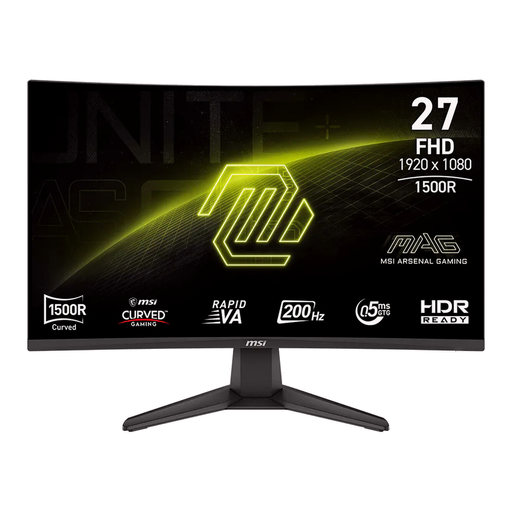
Highlights
With the MAG 276CF E20, MSI strikes an excellent balance between performance and features. Its 200 Hz refresh rate and 0.5 ms response time place it in the top tier for responsive gaming. It features a "Rapid VA" panel with a 1500R curvature and AMD FreeSync Premium technology. Bonus features like AI Vision, which brightens dark areas, make it a powerful ally.
Advantages
Who is it for? This monitor will delight versatile gamers who switch between demanding competitive games and immersive single-player titles. It offers a noticeable boost in fluidity over 144?Hz while maintaining excellent image quality for all uses.
Our selection is an excellent starting point to guide you toward the 27-inch curved gaming monitor that's right for you. If you have different needs—whether in terms of size, resolution (QHD, 4K), or budget—many other models deserve your attention.
? For an even wider selection, explore our full range of curved monitors.
Yes, absolutely. The curvature of a 27-inch screen (typically 1500R) enhances immersion by expanding your peripheral vision. This can help you spot movement on the edges of the screen more easily, a significant advantage in FPS games. However, the choice between a flat and a curved screen is ultimately a matter of personal preference.
It's all about smoothness. Moving from 60?Hz to 144?Hz is a spectacular leap forward, resulting in a much sharper and more responsive image. The jump from 144?Hz to 200?Hz or 240?Hz offers a further improvement, although the gain is more subtle to an untrained eye. These extreme refresh rates are primarily sought after by competitive players for whom every millisecond counts.
Yes, most gaming monitors are PS5 and Xbox compatible. However, be sure to check the specifications carefully. To enjoy 120?Hz mode on these consoles, the monitor must have an HDMI 2.0 (or 2.1) port and support that frequency via HDMI. The CRUA model, for example, reaches 120?Hz on its HDMI port, making it perfectly compatible with the Performance Mode on next-gen consoles.