
Livraison le jour même ou le lendemain

Qualité garantie

Débloquez vos offres de bienvenue: Livraison GRATUITE | Jusqu'à -80 % | 30 jours d'essai gratuits à JoyPlus
Téléchargez l'application
Navigating the dense world of gaming monitors can be a daunting task. Spec sheets are riddled with jargon, and marketing claims make lofty promises. As hardware experts, our mission is to cut through the noise and provide you with clear, concrete advice. Our goal: to help you identify the features that truly matter for a 27-inch 180?Hz gaming monitor and avoid the common pitfalls that lead to buyer's remorse.
Before diving into specifications, let's review the most common mistakes. A poor choice can hamstring your gaming experience (and your productivity) for years to come.
To make the right choice, three technical criteria are non-negotiable. They form the foundation of a quality visual experience, whether for gaming or more versatile use.
For a 27-inch screen, 2K QHD resolution (2560 x 1440 pixels) represents the perfect balance. It offers a much higher pixel density than Full HD (1080p), resulting in sharper, more detailed images without demanding the monstrous computing power of a 4K PC monitor. For gamers, this means being able to maintain a high refresh rate without owning the most expensive graphics card on the market. It's the perfect sweet spot for a mixed-use office and gaming monitor.
The choice of panel has a direct impact on colour rendering and immersion.
This technology synchronises the monitor's refresh rate with the number of frames per second (FPS) sent by the graphics card.
Here are a few models that cater to distinct user profiles, taking into account our performance criteria and the pitfalls to avoid.
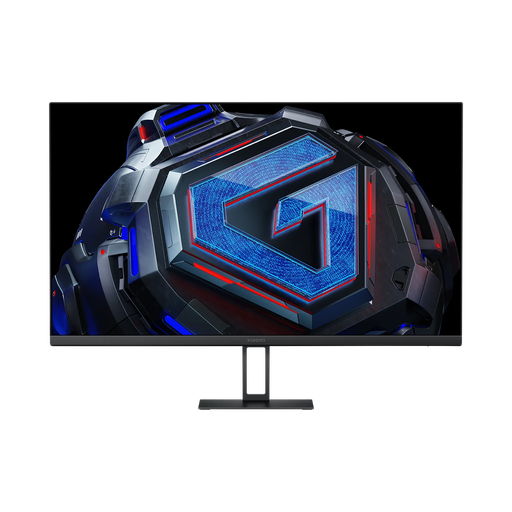
Why this one? Engineered for performance, it combines an ultra-responsive Fast IPS panel with 2K resolution and a 180 Hz refresh rate. It's a precision tool for FPS and esports fans who demand maximum clarity and responsiveness.
Its Fast IPS panel ensures a true 1 ms GTG response time, avoiding the visual artifacts of MPRT while guaranteeing impeccable clarity in the heat of battle.
Its wide colour gamut coverage (95% DCI-P3) and G-Sync compatibility make it as precise as it is fluid, even with an NVIDIA card.
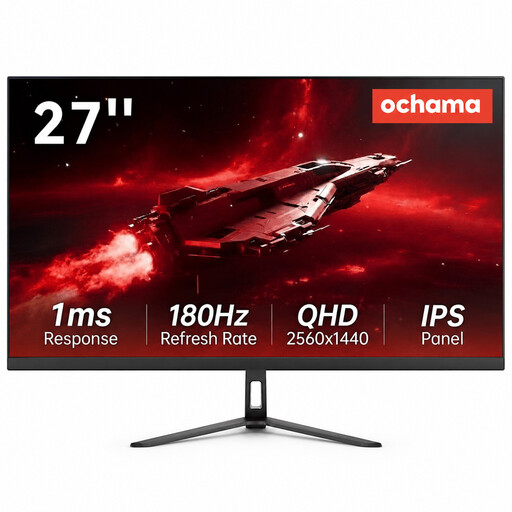
Why this one? It's the perfect Swiss Army knife for juggling gaming, work, and multimedia. Its ultra-narrow bezels make it ideal for a multi-monitor setup, a real bonus for productivity.
Rather than limiting itself to gaming, it embraces its status as a do-it-all display, without making you pay for niche features you'd never use.
The magic trio of 27-inch, 2K, and 180 Hz ensures a detailed and ultra-smooth experience in all scenarios, from Excel spreadsheets to intense gaming sessions, all in a sleek, modern design.
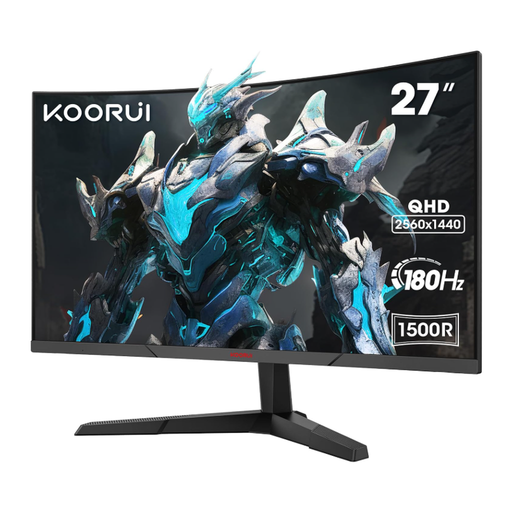
Why this one? Perfect for fans of RPGs, simulation games, or cinephiles. Its 1500R curve, coupled with the VA panel, creates an enveloping visual experience where high contrasts bring virtual worlds to life.
It commits to its focus: this is a pure-bred curved VA monitor. Instead of trying to do everything, it bets it all on immersion thanks to its superior contrast, perfectly meeting its target audience's expectations.
The combination of a 1500R curve, QHD resolution, and a VA panel offers an image depth and immersion that a flat screen can hardly match, all with the fluidity of 180 Hz.
Explore our full selection of monitors that meet our quality criteria and industry standards.
Is a 180?Hz monitor really better than a 144?Hz one? The difference between a 144?Hz gaming monitor and a 180?Hz model is subtle, but tangible for discerning gamers. It translates to a step up in fluidity and motion clarity, which can provide an edge in very fast-paced games. For a casual gamer, the difference will be less noticeable. The real leap forward remains the jump from 60?Hz to 144?Hz (or higher).
What cable do I need to get 180?Hz at QHD? Absolutely, the cable choice is crucial. To ensure sufficient bandwidth for 2560x1440p at 180?Hz, using a DisplayPort 1.4 cable is essential. While HDMI 2.1 might theoretically be enough, DisplayPort remains the gold standard for guaranteeing the maximum performance advertised by the manufacturer.
Is a "G-Sync Compatible" monitor reliable with an NVIDIA card? The "G-Sync Compatible" certification indicates that a FreeSync monitor has been tested and validated by NVIDIA to work without issues with its graphics cards. FreeSync Premium certified models are generally excellent candidates. To enable it, you just need to check a box in the NVIDIA Control Panel. Today, the vast majority of recent monitors offer a smooth experience, whether or not they are on NVIDIA's official list.