
Livraison le jour même ou le lendemain

Qualité garantie

Débloquez vos offres de bienvenue: Livraison GRATUITE | Jusqu'à -80 % | 30 jours d'essai gratuits à JoyPlus
Téléchargez l'application
Engraving a plaque, removing burrs from a 3D-printed part, drilling a small wooden component or polishing metal: a 160 W multifunction rotary tool brings together a wide range of uses in a compact format. However, high power and a long list of accessories are not enough to guarantee a good purchase.
For DIY enthusiasts, makers and model builders, three mistakes are particularly common:
For a rotary tool with accessories, the wattage indicates the nominal electrical consumption, but not directly the quality of the result. With its 160 W, a model can handle engraving, light drilling, sanding, cutting small parts, grinding and polishing.
The rotation range matters just as much. A 6-speed rotary tool lets you adjust the speed to suit the material:
A range of 8 000 to 33 000 rpm offers much greater flexibility than a single-speed tool. However, avoid pressing hard on the workpiece: excessive pressure can cause the speed to drop, heat up the material or damage the accessory.
A kit advertised as a 145-accessory multifunction tool may contain several copies of the same consumables. Before ordering, check that you have the right components for your projects:
With a 3D printer, a rotary tool is mainly used to remove supports, smooth edges and refine plastic parts. It does not always replace a file or craft knife. For a thin part, it is best to choose a moderate speed and use light passes to prevent melting or deformation.
A precision DIY tool should remain comfortable to hold after several minutes of use. A soft rubber grip, built-in lighting and an auxiliary handle make it easier to control, particularly when engraving or sanding small areas.
Also examine the clamping system. The chuck should hold the accessory securely, with no noticeable play. Before each use, check that the shaft is inserted far enough and that the accessory rotates smoothly, without unusual vibration.
For use in France and the European Union, check the regulatory information provided by the seller: CE marking where required, instructions in French, the contact details of the manufacturer or the responsible person in the EU, as well as guidance on protective equipment. Wear suitable safety goggles and, when sanding or cutting, use respiratory protection appropriate for the dust produced.
The product cards below distinguish the rotary tool from any complementary products. A drill and precision screwdriver cannot replace a multifunction mini-tool, but they may be more suitable when drilling, screwdriving or assembly make up most of the work.
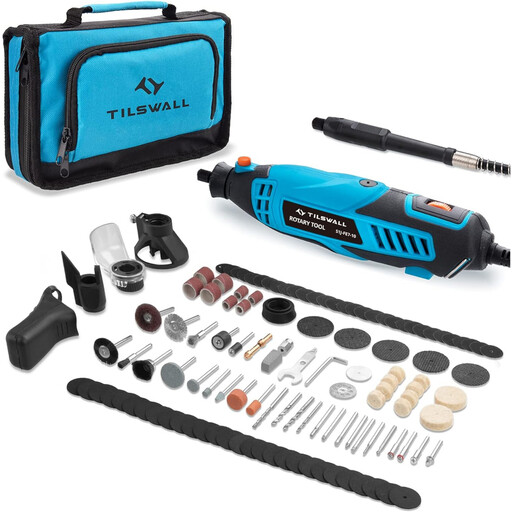
Why this choice suits this user profile : One machine lets you get started with engraving, sanding and polishing without having to invest in a whole collection of tools straight away.
The six speed settings let you gradually become familiar with the tool, while the kit covers several major accessory categories.
160 W motor, six speeds from 8 000 to 33 000 rpm, LED lighting, soft grip and auxiliary handle.
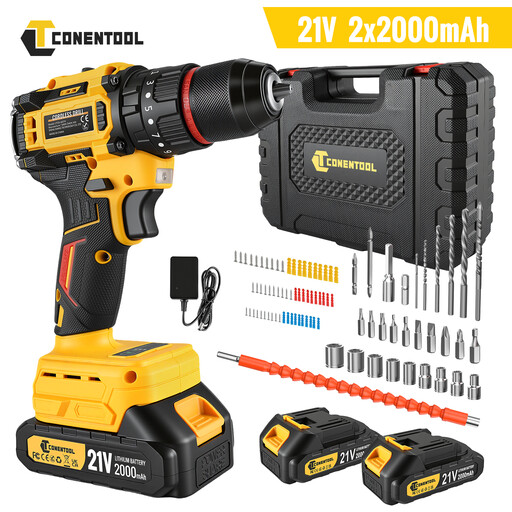
Why this choice suits this user profile : This machine is an effective complement to a rotary tool when the work mainly involves drilling or screwdriving with greater torque.
It avoids assigning intensive drilling jobs to a multifunction mini-tool: its purpose is clearly focused on screwdriving and drilling.
Advertised maximum torque of 50 Nm, two 21 V batteries and 90 accessories according to the product listing.
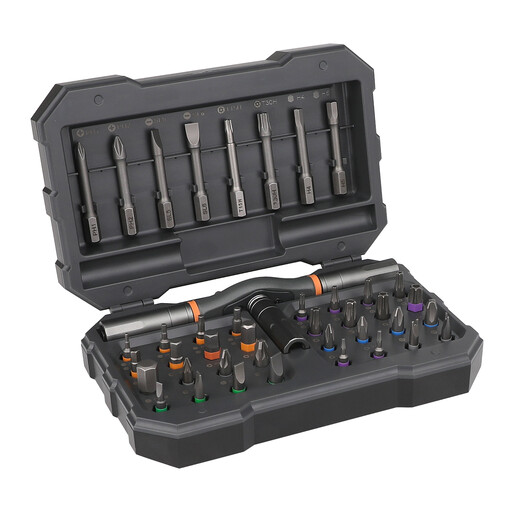
Why this choice suits this user profile : This kit is aimed at makers and 3D printer users who assemble, adjust or maintain small parts alongside a rotary tool.
It reserves the rotary tool for abrasive and finishing work, using a manual screwdriver bit when the part requires precise tightening.
40 bits, 8 long 45 mm bits, ratchet handle and storage designed for transport.
We have brought together a comprehensive selection, updated in real time, of products that meet these demanding criteria while also taking European safety regulations into account.
To preserve the performance of a tool for engraving and drilling, a few simple habits are all it takes:
Running costs mainly depend on how many cutting discs, abrasive bands and drill bits you use. A well-stocked kit can reduce your initial purchases, but check that compatible accessories will still be easy to find later on.
Yes, for removing burrs, taking off supports and smoothing small areas. When working on plastic, use a moderate speed and make short passes to limit heat build-up.
It depends on how often it is used, ventilation, the pressure applied and whether worn accessories are replaced. Regular cleaning and use without overloading help preserve the motor.
Start at low or medium speed so you can observe how the material reacts. Polishing may require a higher speed, but it must remain compatible with the pad, the compound being used and the instructions in the manual.