
Livraison le jour même ou le lendemain

Qualité garantie

Débloquez vos offres de bienvenue: Livraison GRATUITE | Jusqu'à -80 % | 30 jours d'essai gratuits à JoyPlus
Téléchargez l'application
The iPad Air is a fantastic tablet, equally adept at productivity and creative work. To unlock its full potential and transform it into a true ultra-portable, an external keyboard is essential. But with a sea of accessories on the market, it's easy to make the wrong choice, turning a great experience into a disappointment.
As the Head of Product Curation at Joybuy, my mission is to help you navigate the options. Here are the most common pitfalls to avoid and the key criteria to focus on to find THE perfect keyboard for your 11-inch iPad Air and your needs.
To make the right choice, focus on a few technical details that will make all the difference in your daily use.
The "11-inch" label isn't enough. The iPad Air and iPad Pro have evolved over generations. The only foolproof method is to check your tablet's model number (a code starting with "A" engraved on the back) and cross-reference it with the compatibility list provided by the keyboard manufacturer. This is the only way to guarantee a perfect, millimeter-precise fit and optimal functionality.
A good iPad keyboard must, above all, feel great to type on. Here are the key points to watch for:
Rather than an endless list, here are three models that cater to distinct user profiles, all while meeting our strict selection criteria.
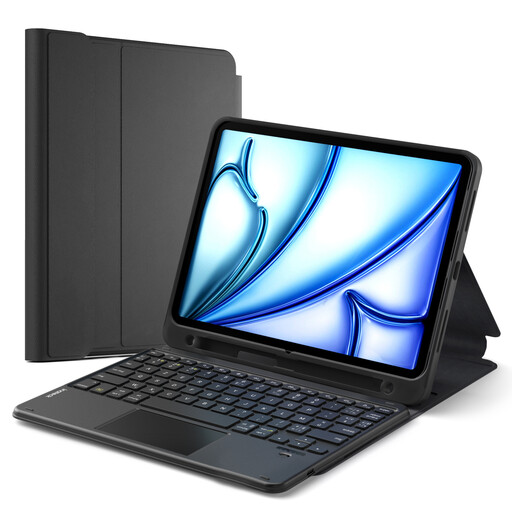
Why we chose it: The ideal solution for juggling typing, drawing, and reading. Its 2-in-1 design (protective case + detachable keyboard) offers maximum flexibility for classes, work, and leisure, without ever sacrificing your iPad's protection.
Its sturdy back shell protects the iPad even when the keyboard is detached. Most importantly, its ultra-detailed compatibility list by model number (Axxxx) eliminates any risk of a purchasing error.
Its 2-in-1 modularity (separable case and keyboard) and its integrated stylus holder that supports magnetic charging.
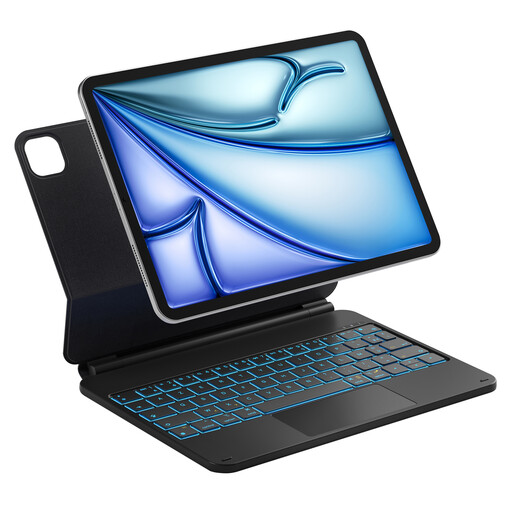
Why we chose it: Perfect for mobile professionals who want to turn their iPad into an efficient workstation in an instant. Its "floating" design and aluminum alloy hinge give it a sleek, premium feel, very close to the experience of an ultra-portable laptop.
Its robust alloy hinge is built to last, eliminating the risk of weak attachments found on low-end models. Smart power management (auto sleep/wake) optimizes daily battery life.
Its elegant floating design with an adjustable angle up to 130 degrees and its customizable backlit keyboard (7 colors).
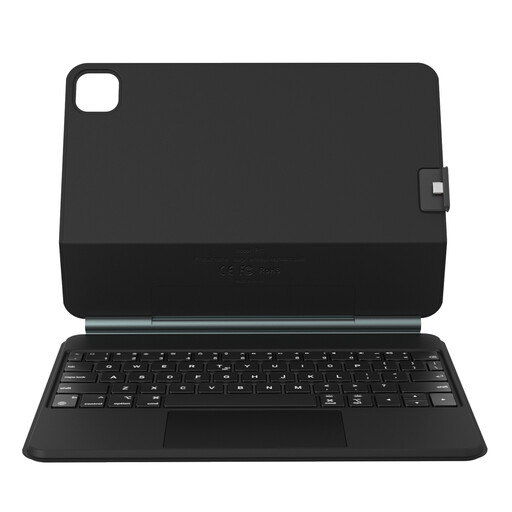
Why we chose it: It takes the most sought-after features (magnetic floating design, large precision trackpad) and makes them more accessible. It's the smart choice for students and content creators who want a "pro" experience without the corresponding budget.
Its powerful magnetic attachment system ensures a stable connection, eliminating the risk of the iPad falling. Its two-part structure allows you to use just the protective case when needed.
The floating magnetic design with a detachable back cover, combined with a large glass trackpad for ultra-smooth navigation.
We have compiled a complete and up-to-date selection of products that meet our strict selection criteria and current standards.
Battery life can vary wildly. Without backlighting, most models last several weeks, or even a month, with moderate use. But with the backlit keyboard enabled, expect to recharge every one to two weeks, depending on the brightness level and your usage. The good news is that most of them charge via a USB-C port, just like the iPad.
In theory, yes, but caution is advised. Recent iPad Air (M2, M3, M4) and 11-inch iPad Pro models share very similar dimensions, making many accessories, like a keyboard cover for the iPad Pro 11, compatible. However, minor differences in thickness or the camera bump may still exist. The only rule to follow: check the manufacturer's compatibility list, which must explicitly mention your iPad's model and generation.
It couldn't be simpler. Turn on the keyboard and activate its pairing mode (usually by long-pressing a dedicated key). On your iPad, go to Settings > Bluetooth and make sure it's turned on. The keyboard will appear in the "Other Devices" list. Simply tap its name to complete the connection.